
Goodly
Moderator
-
Joined
-
Last visited
Everything posted by Goodly
-
 You can't install plugins on the webclient.
 -
1. Who made the Goodly fursona avatar? Me 2. Did Andrew send you the fanart? No 4. Doesn't your fursona get too hot having both fur and clothes on? No 5. Does your fursona have hooves or feet? 5.25. If it has feet does fur too? Feet and fur aren't mutually exclusive 5.5. If it has hooves how is it supposed to run without toes? The end can bend 5.75. Does your fursona wear shoes? Yes 6. Why is your name Goodly when your plot is named Goodlyay? goodlyay is my old username 8. Why can't I send you private messages? I disabled DMs on the forums due to getting too many stupid DM questions that would be way easier to answer live 9. Why are you always up so late? Please go to bed more often so I can make a mods are asleep joke. You'll be happy to know that I almost always go to bed daily 10. Can I have your full name so I can get your fullest attention in the most important moments? Bo Jane Bugami

-
https://github.com/NotAwesome2/Nas
-
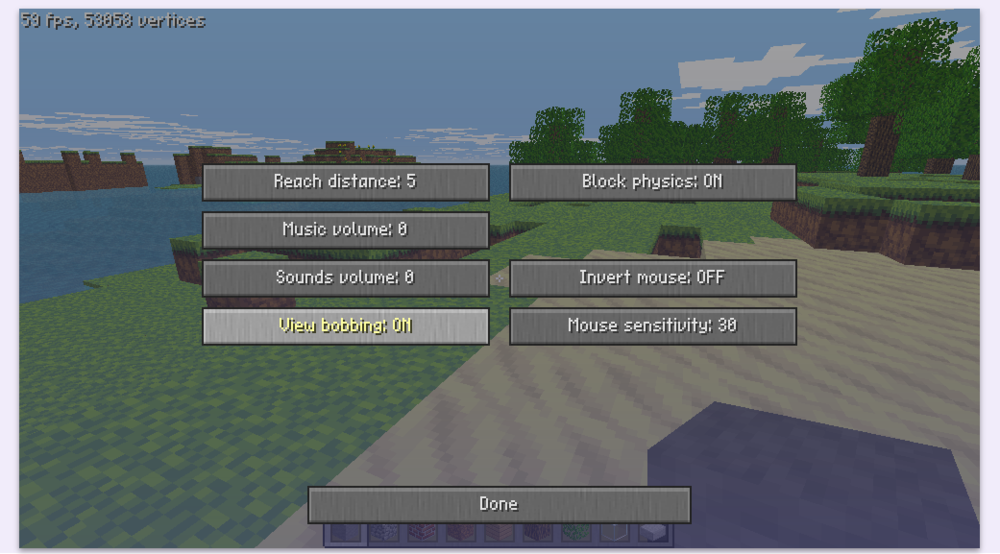
Are you looking for this setting, which is in "Misc options..."? "Classic walk anim" changes how you see other player models when they walk around
-
in the block menu, does denzy have permission to place or break any blocks? (mouse over them) Additionally I'd have to wonder if he has any client plugins/mods
-
We need more information. What exactly happens when your friend tries to break or place? Does the server revert the change, or is the change never made to begin with? What is your friend's username?
-
https://www.google.com/search?q=how+to+port+forward
-
It's strange to me that FemtoCraft kicks even localhost if their name isn't verified. There should be an exception for that
-
You have been banned for inappropriate sexual roleplay after explicitly being warned that if you did it again you would be permanently muted or banned. To be clear, you weren't banned just because of blackroses being in your room joke. On a side note, this forum is not meant to be used for ban appeals. NA2 does not currently have any process in place to appeal bans.
-
classicube.s3.amazonaws.com/skin/Boink.png
-
You should post the source code when asking for help. Make sure when you change Player.Message to p.Message that you remove “p, “ from the first argument
-
It is unsupported, sorry.
-
Since MCGalaxy uses C# .net, you can use ILSpy
-
Don't do this. This is how you get your server ruined by people who pretend to be trustworthy. Seen it a million times If you absolutely must, though, we would need to know what you are using to host exactly to answer the question.
-
The app you used to brighten it left the edges darker. Meaning there will be obvious dark lines when the clouds repeat. You should use something else to edit them.
-
Am I correct in reading this code that this displays everyone with the rank advbuilder or higher? Shouldn't it at least default to operator?
Welcome to classicube! I’m assuming you’re in single player since you mentioned flooding. Sponges clear an area of water when you place them which should be the fastest way to remove water. There is also a hax setting called “breakable liquids” (esc menu) that allows you to break water directly by making water target-able. Finally, there is also an option in i believe misc settings menu that allows you to turn off water flooding entirely by stopping block physics.
Check here for a description of all of them. Also, I forgot that you have to include Server. before the VERSION_0020 in my hypothetical plugin. like if (p.ProtocolVersion != Server.VERSION_0020)
You're right, I forgot that the client actually sends different protocol versions. I was thinking about how classic versions didn't send an AppName, but that's not needed to tell the difference in this case. So basically it is possible, with a simple plugin. You can copy the KickNoCC plugin and modify it so that instead of checking p.appName, it can check if (p.ProtocolVersion != Server.VERSION_0020) then p.Leave and set p.cancellogin to true
Unless 20-23a implements unique network behavior compared to other versions, this is impossible
It would help if you told us where you got this plugin from.
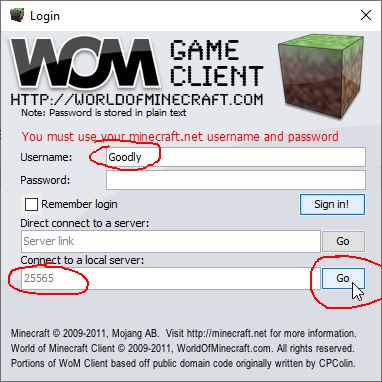
Looks like you should probably just use UnknownShadow200's solution then, WoM sounds a bit too much of a hassle for you. If you really wanted to try WoM though I'd recommend trying to install java if you haven't already, or if you have, get java 6 specifically
Could you have given a less helpful response? lol Did you download WoM from the link I provided? If so, can you provide a picture of the menu it brings up?
No account is required if joining your own local server. Enter any username you wish then enter the port and hit "Go"