



Goodly
Moderator
-
Joined
-
Last visited
Everything posted by Goodly
-
 Yes. Using the server property "agree-to-rules-on-entry = true", you can prevent players from building or using commands before they agree to the rules. Then you can use a plugin to override the normal /rules agree behavior to require a password based on your specifications. Here is an example plugin. You would place this inside a file called forumpass.cs in your plugins folder, then use /pcompile forumpass , /pload forumpass using System; using MCGalaxy; using MCGalaxy.Events.PlayerEvents; using MCGalaxy.Commands; namespace Lol { public sealed class ForumPass : Plugin { public override string creator { get { return "Goodly"; } } public override string name { get { return "forumpass"; } } public override string MCGalaxy_Version { get { return "1.9.3.6"; } } public override void Load(bool startup) { OnPlayerCommandEvent.Register(OnPlayerCommand, Priority.Low); OnPlayerChatEvent.Register(OnPlayerChat, Priority.High); } public override void Unload(bool shutdown) { OnPlayerCommandEvent.Unregister(OnPlayerCommand); OnPlayerChatEvent.Unregister(OnPlayerChat); } static void OnPlayerCommand(Player p, string cmd, string args, CommandData data) { if (cmd.CaselessEq("rules")) { p.cancelcommand = true; if (args.CaselessEq("agree")) { if (!p.hasreadrules) { p.Message("You must read the rules before agreeing to them. Dimb ass."); return; } if (p.agreed) { p.Message("You already agreed to the rules."); return; } p.Message("To agree to the rules, you must enter /pass [pass] from your forum account."); return; } p.hasreadrules = true; //Since we are overriding the normal rules command, you must display the rules here via p.Message p.Message("Rules:"); p.Message("0. Make a forum account to play here."); p.Message("1. Don't make your level too difficult to join"); p.Message("2. TODO"); return; } if (cmd.CaselessEq("pass")) { p.cancelcommand = true; //the command /pass actually exists and does something else but we're going to hijack it because it is //one of the few commands that actually invokes OnPlayerCommand before the user has agreed to the rules if (p.agreed) { p.Message("You already correctly entered the password."); return; } if (!p.hasreadrules) { p.Message("&9You must read &T/Rules &9before entering the password."); return; } if (args.Length == 0) { p.Message("Please enter a password."); return; } if (args != GetPassword(p)) { p.Message("Incorrect password."); return; } p.Message("&6You've succesfully entered the password. Welcome!"); Command.Find("rules").Use(p, "agree"); return; //this return is only here in case you add other command cases below this if statement } } static string GetPassword(Player p) { //Modify this method for your requirements return p.name + "waow"; } static void OnPlayerChat(Player p, string message) { // Optionally mute players who haven't entered pass yet //if (!p.agreed) { p.Message("&cBefore speaking, you must read /rules then agree to them with /agree."); p.cancelchat = true; } } } } If you modify the file and want to reload the plugin, use /punload forumpass , then /pcompile forumpass, then /pload forumpass
 -
The webclient is currently broken. Unfortunately you can't do anything on your end to fix it. It should be fixed within a day or so. Until then you may still download the desktop client and play using that. UPDATE: It is now fixed.
-
I wrote a page about creating levels: https://github.com/ClassiCube/MCGalaxy/wiki/Creating-levels
-
First, you can use the source code for reference. Here is the PlayerAwards class: https://github.com/ClassiCube/MCGalaxy/blob/master/MCGalaxy/Modules/Awards/PlayerAwards.cs To use anything from the PlayerAwards class, you will have to add "using MCGalaxy.Modules.Awards;" at the top of your code file. Any method or field that is marked as "public" can be used by plugins and commands. You can use "PlayerAwards.Give" to give an award to a player, but this won't show a global chat message. If you want to show a global chat message, you should have console use the award give command. You can do that like this: const string myAward = "My Secret Award"; Command.Find("award").Use(Player.Console, "give "+p.name+" "+myAward); If you want to check if the player has the award already, you will have to get the list of awards for the player and then check if that list has the award inside of it. You can do that like this: bool hasAwardAlready = false; List<string> currentAwards = PlayerAwards.Get(p.name); if (currentAwards.CaselessContains(myAward)) { hasAwardAlready = true; } As a side note, you can shorten the above code like this: bool hasAwardAlready = PlayerAwards.Get(p.name).CaselessContains(myAward); Here is an example of everything so far put together. Remember you still need "using MCGalaxy.Modules.Awards;" at the top of the file. public override void Use(Player p, string message) { const string myAward = "My Secret Award"; bool hasAwardAlready = PlayerAwards.Get(p.name).CaselessContains(myAward); if (hasAwardAlready) { p.Message("You already found the secret!"); return; // When we write return, that will quit running the command so that the code below doesn't run } //Give the player the award if they haven't already gotten it Command.Find("award").Use(Player.Console, "give "+p.name+" "+myAward); }
-
It stands for distributed denial of service. What this means is that someone uses a bunch of different computers (thousands) to connect to the server and overwhelm it so that it stops working
-
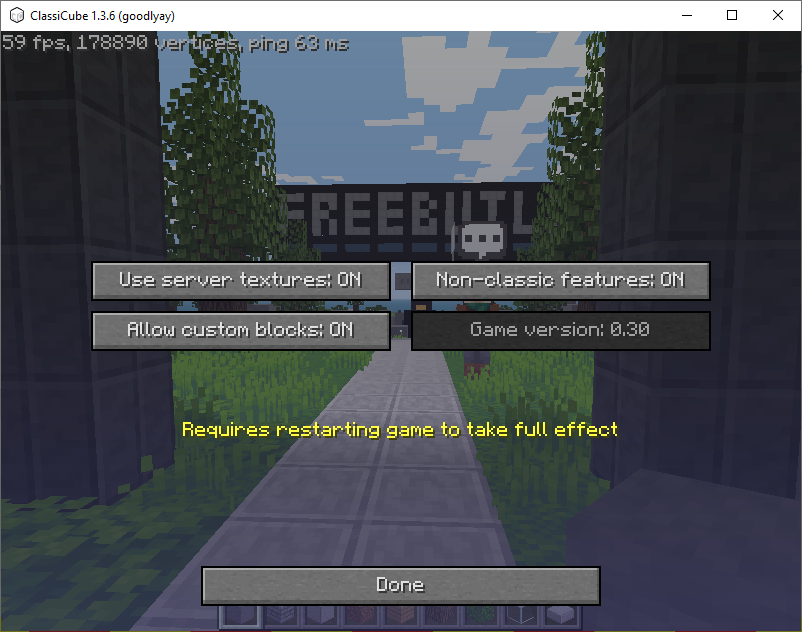
Before you sign into the launcher, go to "Options" then "Mode", then click "Enhanced". After that, make sure all of these options are ON in Options -> Nostalgia Options escape menu.
-
The forums are not for ban appeals
-
Servers can send custom models so no client modification needed there. My main concern with attempting to develop any kind of fps mechanics is that the delay based netcode of classicube makes it kind of unsatisfying and difficult to play. At least for any sort of hitscan-type weapons. No custom sounds or camera feedback(shake, first person fire anim, etc) will also leave the gamefeel lacking. Oh yeah, alecdent mentioned this as well. Definitely doable if someone has the motivation to add it
-
In general anything that requires the client itself to be modified for a new feature is probably not going to happen. The rest of what you've mentioned is doable if a developer is interested in it, but that's all server side stuff so it doesn't really have anything to do with AndrewPH or the core classicube dev 'team' (UnknownShadow200). Nothing relating to survival will ever officially be added to ClassiCube for brand reasons What is CS rotate?
-
/map motd -hax There are other arguments you can add and you can do multiple in the same MOTD. Like /map motd -hax +respawn Look at /help map motd to see every argument.
-
Please take a look. https://github.com/ClassiCube/MCGalaxy/wiki/Level-permissions
-
Why don't you ai-generate some updates for the game
-
That's part of it, but I do actually like going around to active servers when I'm bored to check out what's happening and get genuinely disappointed when it turns out to be fake "activity". That's also why I had joined earlier like you noted If it's not botting to intentionally connect with fake accounts to add more players, I don't know what is. Also keep in mind that MCGalaxy normally counts players based on unique IPs connected, so mike had to go even further out of his way to connect with proxies to get around this. He knew what he was doing.
-
It's because multiple accounts that sit idle in the server don't actually exist as ClassiCube accounts. Not using ClassiCube accounts is not necessarily a problem on its own, but when the owner also intentionally disables afk kick to allow people to idle for hours on end, it sure looks like they're trying to dishonestly boost player count. Snoozer probably said those things because I've complained in the past about multiple servers including mike's on this topic. I think it's pathetic to fake player count instead of making your server more desirable to visit to gain attention authentically
-
"I thought most people in ClassiCube rather play Minecraft over ClassiCube." Probably true for the younger players here who just want free Minecraft. "So, everyone that plays ClassiCube technically plays Minecraft" Actually people that play ClassiCube are playing ClassiCube
-
You can only freely change your picture if your account is 5 years or older. However can always change the head that appears in your avatar by changing your ClassiCube account skin.
-
Yeah, the "extra/text" folder location is confusing. It should probably be inside of the text folder and be called "viewable" or something.
-
For simple commands that just display text, you can do this without any special code. 1. add a text file in "extra/text" folder such as discord.txt 2. add the discord link in discord.txt 3. go to text/aliases.txt and add "discord:view discord" on a new line. 4. restart the server or use /server reload Now when a user writes /discord, it will call /view discord and display the contents of the file.
-
I would suggest joining Not Awesome 2, creating a realm (/os map add) (/os go) and then using /shapeblocks to punch a block into the shape you want. Then use (/os lb info [id]) to see the min and max coords of it.
-
Do not install any plugins written by goldberg. They are known to install malicious plugins that give them backdoor permissions to mess up the server. Goldberg is also known as PurpleDragon and JustinDupa
-
Try uninstalling "KickRussians" plugin
-
Check MapHack custom command here. It may do what you want, but if not its code serves as an example of how to edit the MOTD for a specific player. https://github.com/ClassiCube/MCGalaxy-Plugins?tab=readme-ov-file#commands-list Alternatively, you can edit the MOTD for any given map using /map motd [args] or /os map motd [args]
-
ClassiCube was written in C using visual studio
-
https://github.com/ClassiCube/MCGalaxy-Plugins/blob/master/CmdPruneDB.cs /PruneDB [player1] <player2..> <timespan> Deletes the block changes of [players] in the past <timespan> from BlockDB. Slow and dangerous. Use with care.
-
This does not get your account deleted. It just gets disabled so you can't use it anymore.





