UnknownShadow200
Administrator
-
Joined
-
Last visited
Everything posted by UnknownShadow200
-
 MCGalaxy deliberately does not include remote console functionality - the nearest option in MCGalaxy itself is through IRC. (adding IRC controllers with /IRCControllers, and then set IRC controllers rank in server.properties to nobody)
 -
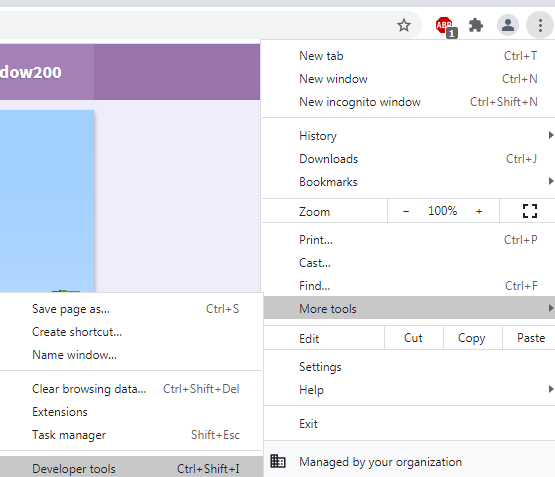
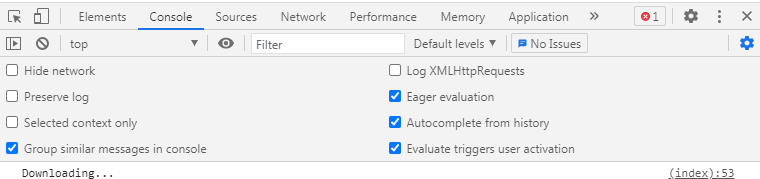
One thing to check is if any warning or error messages are being logged to browser's Console, which might explain why the game is getting stuck loading. For example, with Chrome, you can do that by: Opening Developer Tools Switch to Console tab in Developer Tools You may also have to reload the page for the warning/error messages to show
-
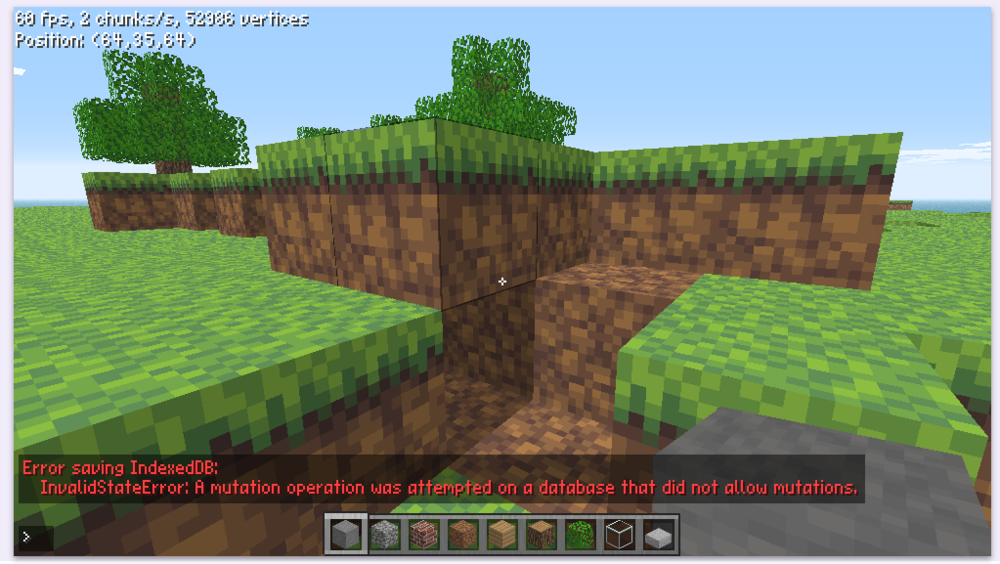
The webclient automatically saves options to IndexedDB anytime you change an option, so there's nothing you can manually configure with saving. I have updated the webclient to log any errors when saving IndexedDB now - so if possible, can you please try changing an option again and see if you get an error message in chat now
-
Can you please provide more details about what specifically you mean by your game is crashing - are you seeing a message box saying ClassiCube has crashed, or are you getting disconnected from servers, or something else?
-
The reason why sounds haven't been implemented isn't because of any sort of technical roadblock, but because of a legal uncertainty. I don't know whether playing the sounds directly from Mojang's resource servers is considered acceptable use or not.
-
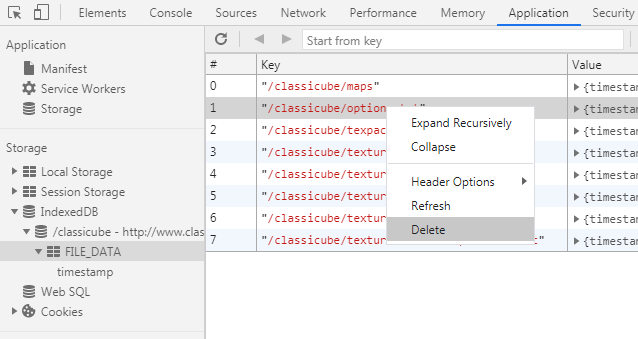
If you're using the desktop/android client, just delete options.txt from the folder where the ClassiCube executable is to reset all your settings. If you're using the web client, it's a bit trickier as you need to delete options.txt from IndexedDB. How to do that depends on which web browser you're using. For example, with Chrome, you can do that by: Opening Developer Tools Switch to Application tab in Developer Tools Select IndexedDB under Storage panel on left pane Expand /classicube, then expand FILE_DATA Right click the /classicube/options.txt entry and then click Delete
-
It's a command, so should be using /compile and /cmdload instead of /pcompile here --- The issue here is that at some point, someone opened and saved CmdAnnounce.dll with a text editor - but .dll files are not text files, which meant that some of the bytes in the .dll file got changed and hence made the .dll unloadable. If you do /compile Announce (to regenerate CmdAnnounce.dll) and then /cmdload Announce again though, it should work.
-
The error you have shown here is an unrelated error that occurred on January 15th when someone tried to do /undo from console
-
What exactly do you mean by sounds can randomly crash?
-
Open Developer Tools in your browser and see if there are any errors noted in Console or Network tab
-
I tested on my own device but unfortunately I could not reproduce this issue. So without a screenshot/recording/something similar of the issue it's a bit difficult to investigate the problem
-
-
Can you please upload a screenshot of this issue?
-
Open Terminal, navigate to the directory which has the ClassiCube executable in it, then type ./ClassiCube into Terminal
-
The game executable intentionally does not have a file extension on linux
-
Are you not able to just run the executable?
-
The reason why sounds haven't been implemented isn't because of any sort of technical roadblock, but because of a legal uncertainty. I don't know whether playing the sounds directly from Mojang's resource servers is considered acceptable use or not.
-
It sounds like cookies are being blocked or not remembered
-
What features are missing from the webclient when used on an iPad?
-
The web version of the game should already work fine on most iPhone and iPad devices -- An iOS application is not really planned currently, mainly because unlike Android which at least offers the option of installing third party applications, iOS only allows installing from the app store. Publishing an application for the app store would require spending $100 per year for an Apple Developer membership, without even the guarantee that such an application would be accepted onto the app store.
-
There is dedicated plugin for exporting to .obj, which can then be imported into say Blender. https://github.com/UnknownShadow200/ClassiCube-Plugins/tree/master/ObjExporter
-
What exactly do you mean by that you can't download texture packs? --- Texture packs uploaded in 'Change texture pack' intentionally don't last. Once you close the tab, they disappear, hence why you see 'No such file or directory' the next time.
-
Alas I don't know how that can happen, so I have implemented an alternative in the latest dev build. If you download http://cs.classicube.net/c_client/latest/ClassiCube.exe and add http-no-https=True into options.txt, the game should now be able to login. (Although enabling this option means your account password is now sent across the network unencrypted)
-
How specifically are you opening and saving the png images from the game's texture pack? I can only seem to get it to open/save images from one specific folder.
-
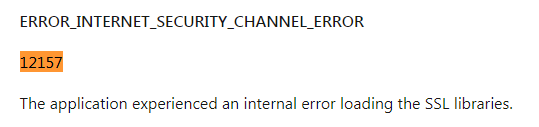
Unfortunately, the error you are getting suggests a system specific issue. Even just reinstalling IE6 might help there. IE6 should still be able to access classicube.net, although may have to enable 'Use TLS 1.0' in Tools -> Internet Options -> Advanced -> Security first.