



UnknownShadow200
Administrator
-
Joined
-
Last visited
Everything posted by UnknownShadow200
-
 In navigation bar, Other stuff -> Staff Hello potential developer applicant, All candidates are required to possess the following experience at a minimum before applying: 15 years experience in Memory Leaking (C) 20 years experience in Microsoft Java (C#) 25 years experience in YourSQL & SQLime 30 years experience in Subjective C 35 years experience of Scripting in Java (JavaScript) 40 years experience in snake taming (Python) 45 years experience in violence (bash) 50 years of committing to the client github After a 100 year unpaid internship, you may be considered for the developer role.
 -
denzy's account previously did /reach 0, and therefore will be unable to modify blocks more than 0 blocks away from them. Doing /reach 5 on that account will revert block modification range back to the default range of 5 blocks.

-
You need to install DigiCert Baltimore Root SSL certificate to the root certificate trust store, as without this the SSL certificate of classicube.net is unable to pass authenticity validation Simplest way to generate a .cer file for Baltimore Root SSL certificate is by exporting the root certificate from Chrome Then follow the tutorial from https://support.globalsign.com/ca-certificates/root-certificates/update-globalsign-root-certificate-windows-xp-windows-2000, but install the previously created .cer file instead of Root-R1.crt If that still doesn't work, then try adding https-verify=false to options.txt to disable SSL certificate validation (this is still a bad idea security wise) This should only be done as an absolute last resort, because turning on this option means your account password is transmitted over the network in plain text
-
In Escape -> Options -> Nostalgia Options (or ... -> Main Menu -> Options -> Nostalgia Options), have either of the following options been turned off? Allow custom blocks Use CPE
-
There a is a API available for plugins, although it's quite limited https://github.com/UnknownShadow200/ClassiCube/blob/master/doc/plugin-dev.md An example of adding something that only works in singleplayer only: copy e.g. https://github.com/ClassiCube/ClassiCube-Plugins/blob/master/SchematicExporter/SchematicExporter.c and change the false to COMMAND_FLAG_SINGLEPLAYER_ONLY
-
Can you please copy or screenshot the crash error message you are getting?
-
See https://f.classicube.net/topic/1627-script-error/ As a temporary workaround, changing /server/play/ to /server/mobile/ in the address bar should bypass this issue for now (We are still working on properly fixing the issue)

-
How about http://www.classicube.net/server/mobile/?warned=true ?
-
Try http://www.classicube.net/server/local/?warned=true and seeing if that gives you a different error asides from Script Error
-
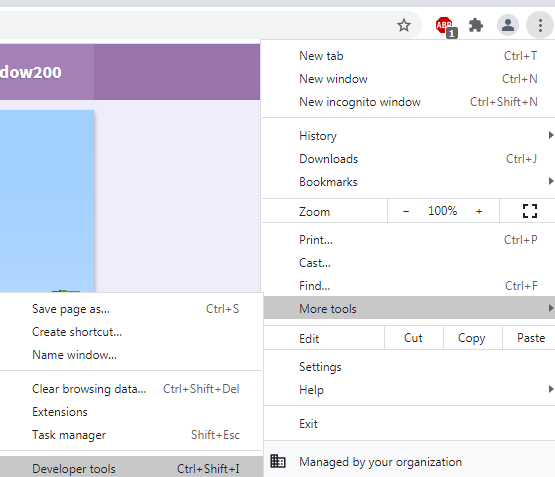
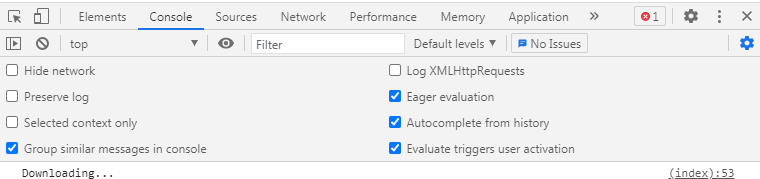
Complete warning/error messages are usually logged to browser's Console, so checking what's logged there is a good place to start With Chrome you can do that by: Opening Developer Tools Switch to Console tab in Developer Tools You may also have to reload the page for the warning/error messages to show
-
Which web browser and device are you using? Do you consistently get this error?
-
I wrote a custom command for MCGalaxy that will export the current level to a .dat file, which may be of some assistance https://github.com/ClassiCube/MCGalaxy-Plugins/blob/master/CmdExportDat.cs
-
-
Saving the map (via escape -> save level) also saves the custom blocks in the map So rather than modding the game, it's usually simpler to run a locally hosted server, define custom blocks, then save and load the map in singleplayer (e.g. using MCGalaxy and defining custom blocks using this guide) If still want to mod the game then: 1) Download the game's source code 2) Modify Block.c and add the properties for new custom blocks there (good places to start from are Block_ResetProps / DefaultSet_XYZ functions) 3) Compile game's source code using instructions in readme
-
Unfortunately just knowing that an Unhandled signal occurred isn't enough information to work out what caused the crash Can you please copy the contents of or upload client.log from your game folder so I can look into your crash?
-
I have attempted to make a fix this crash. Can you please update your game to the latest dev build and see if that fixes your crash? Crash dialog screenshots are usually sufficient to work out what causes a crash (except on Android)
-
Unfortunately just knowing that an Unhandled Exception occurred isn't enough information to work out what caused the crash Can you please copy the contents of or upload client.log from your game folder so I can look into your crash?
-
Pay me one billion $AUD within the next 24 hours and I will make it happen
-
If you update your game to the latest dev build, you should be able to load this map now, although you'll still see a warning: (out of curiosity, do you remember where you got this map from? I'm wondering what generated this partially broken level file) Thanks icanttellyou for providing the .lvl file. Technical details of the issue with this level file: The file itself: 1. Gzip header - okay 2. Compressed data - okay 3. Gzip trailer - okay The decompressed data: 1. Map header - okay 2. Map blocks - okay 3. Map custom block section identifier - okay 4. Map custom block section contents - only 1 byte long instead of 2048 Not sure why only 1 byte got written, but the 'uncompressed data size' in Gzip trailer also agrees with it only being 1 byte long instead of 2048. MCGalaxy happens to load this map by accident, as it ignores the end of stream error when reading the map's custom block section contents.

-
Can you please upload the .lvl file somewhere so I can have a look at it?
-
What do you get for /client gpu output?
-
What is the exact line of text that you are adding to fontscache.txt?
-
Are you seeing any error messages about failing to load options.txt when starting the game? Which players having issues with loading options.txt? Venk's issue with options.txt being reset was due to using the client in a way that almost no one would ever normally do.
-
If you turn off Block Physics in Esc -> Options -> Misc Options, you shouldn't experience crashing with large maps anymore (workaround until https://github.com/UnknownShadow200/ClassiCube/issues/812 is eventually fixed)
-
Did you specifically do /os map terrain? Command you probably want is actually /os map texture



