Jump to content
View in the app

A better way to browse. Learn more.

ClassiCube Forum

A full-screen app on your home screen with push notifications, badges and more.

To install this app on iOS and iPadOS
  1. Tap the Share icon in Safari
  2. Scroll the menu and tap Add to Home Screen.
  3. Tap Add in the top-right corner.
To install this app on Android
  1. Tap the 3-dot menu (⋮) in the top-right corner of the browser.
  2. Tap Add to Home screen or Install app.
  3. Confirm by tapping Install.

Herobrine spotted!!!

  • Replies 26
  • Views 11.4k
  • Created
  • Last Reply

Top Posters In This Topic

Most Popular Posts

Posted Images

Featured Replies

You know you could just make a bot and change the skin to herobrine and you could probably spot herobrine 24/7 EZ.

  • 1 month later...

I highly doubt you saw Herobrine most of the sightings on Classicube or Minecraft are usually all fake.

1 hour ago, lashednova said:

I highly doubt you saw Herobrine most of the sightings on Classicube or Minecraft are usually all fake.

you just a hater ngl 

1 hour ago, lashednova said:

I highly doubt you saw Herobrine most of the sightings on Classicube or Minecraft are usually all fake.

"usually"

so you're implying some of these sightings are not fake?

  • Glodden Godd

I occasionally see Herobrine in real life.

7 hours ago, im20op1234 said:

herobrine is not real and don't lie

I will lie. Good day, sir.

  • Glodden Godd
7 hours ago, im20op1234 said:

herobrine is not real and don't lie

Herobrine lies all the time.

On 9/26/2023 at 4:01 PM, im20op1234 said:

herobrine is not real and don't lie

Wdym he clearly is bro, trust me 

  • 2 months later...
  • 2 weeks later...

hero brain??????????? spottedd???? how do u recover from this scary situaton......

On 7/31/2023 at 3:35 AM, Geskawary234 said:

I was just hanging out at my server when herobrine came out of nowhere!!!Herobrine1.png.8b1e342fc7c1362339f9553ec0e71a50.pngHerobrine1.png.8b1e342fc7c1362339f9553ec0e71a50.png
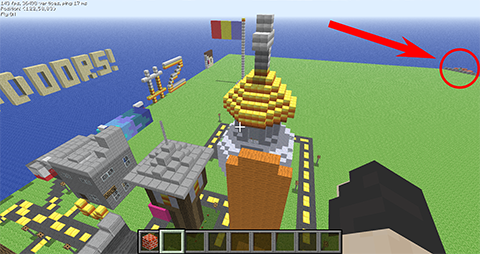
woaw

  • 3 months later...
  • 3 months later...
  • 6 months later...

I don't see Goku standing menacingly somewhere in the image...

spacer.png

READ THE RULES BEFORE YOU POST

Create an account or sign in to comment

Configure browser push notifications

Chrome (Android)
  1. Tap the lock icon next to the address bar.
  2. Tap Permissions → Notifications.
  3. Adjust your preference.
Chrome (Desktop)
  1. Click the padlock icon in the address bar.
  2. Select Site settings.
  3. Find Notifications and adjust your preference.