



AnarchyDarkWolf
Glod Menbie
-
Joined
-
Last visited
Everything posted by AnarchyDarkWolf
-
 I think the problem you are having is the mouse not staying in the screen? I can't really tell what you said through your description that you wrote. But if I am correct, and you want the cursor to be locked into the game, go over to chrome://flags/#exo-pointer-lock and click enable. You also need to restart the computer for it to work.
 -
You're probably too young to have 9/11 flashbacks.
-
Use C#. I believe everyone uses C# for MCGalaxy plugins, basically the default Classicube server hosting software.
-
HP Elitebook 2570p Processor: Intel Core i5-3210M dual-core processor RAM: 12gb DDR4 Graphics Card: Intel Integrated HD Graphics 4000 420 gb SATA Kingston SSD Screen: 12.5-inch HD anti-glare 720p (1366*768) with LED backlighting Computer fits my needs. Runs Minecraft and ClassiCube fine. Usable for school.
-
If I was president I would recruit many individuals in Congress, and have them all vote to disband the Government of the United States and gain control of the military. I would replace the democracy with a nice dictator (me). Then I would make ClassiCube a required study in schools to teach them how not to act.
-
-
That is signs of suicide there buddy. "Die police die". Not ok.
-
Who were you fucking in Tennasee?
-
Good times
-
And fuck you to
-
Pretty Sure This Is What You Want Because I Found This In His Github: https://github.com/derekdinan/ClassiCube-Stuff/blob/master/MCGalaxy/Plugins/HoldBlocks.cs
-
They do have a discord server that you can join. Pretty sure I saw you on it before.
-
Then I don't know what's wrong. Besides typos. It's saying that the file is missing. You must have done something wrong to not compile it right if you have the cs file.
-
Did you do /pcompile? You need to do that first. /pcompile filename.cs. This compiles it into a .dll. Then you can do cmdload. languages like C# requires you to compile it.
-
I don't think that is the error you receive directly after you run the /pcompile command.
-
Your server needs more memory to store plugins.

-
You can report the problem on github like UclCommander suggested. Or ask someone, like Andrew or 123DMWM to help you fix it.
-
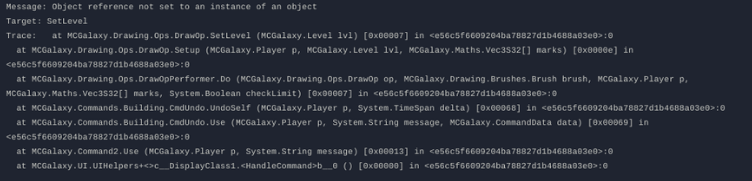
That is a error code for the code itself. There is no dll because it has not compiled this due to the code inside of the plugin.
-
A screenshot and/or video could be helpful.... compiling a plugin isn't that hard, unless the code itself is the problem.
-
KawaiiCube just called out sir0mac broooo
-
Whoever had console, such as Deadkiller, probably gave it to them. I don't see them being able to hack EddyNetWeb.
-
Pretty much screwed if they have console. You can't do anything else. You can try to evade ban.
-
-
Do you have linux? I have been able to set up a test server with MCGalaxy. And I believe you can port forward to make it go public.
-
I hate it when @megaboi internet goes out a lot.



