
Goodly
Moderator
-
Joined
-
Last visited
Everything posted by Goodly
-
 "Big whoop", "Baby", and "Clock" were removed if I'm remembering correctly.
 -
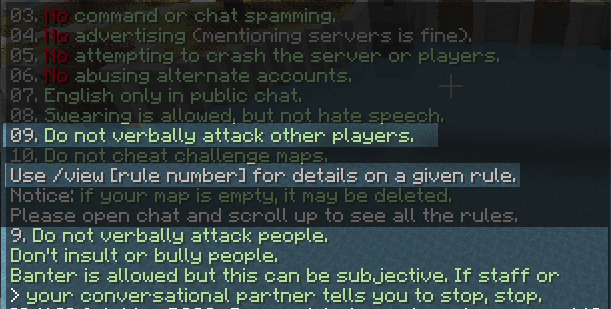
You're acting stupidly dishonest trying to make a point that "it's not against the rules to evade mute". It shouldn't even have to be stated not to do this, but either way the rules cannot possibly be exhaustive, because as you've already proven, people will NOT bother to read them if they contain too much information. That's why we have staff, so that reasonable judgements can be made about the acceptability of behavior.
-
One way to think of this is to think of this
-
To change your skin, when you're signed in to classicube.net, click your username on the top right. Adding additional blocks is more complicated. If you're in singleplayer, it's not possible. If you're in a personal realm in an MCGalaxy server (most servers are MCGalaxy), you can say /os lb create Then follow the instructions by entering the values you want. (e.g., next step is to say /os lb My custom block, to name it) If you are the owner of the server, you can use /gb create, to create global blocks, or /lb create, to make blocks only in the specific level you're in.
-
Power outage data loss
-
It gives you each step as you do the command. just answer with /os lb [answer] You can start creating a custom block with /os lb create
-
"It's" is referring to NAS in my previous post.
-
The power to my house was turned off. It's back now.
-
Is there a specific event that happened to make you ask for these rules? One of the things to note about racist and bigoted people is that (at least in my experience running a server for 8 years) they will ALWAYS deny that they are doing hate speech. So it doesn't actually matter if there's rules against it or not, they will still complain they got banned for no reason, or disingenuously word it as banned for "having a different opinion." So as long as it is enforced in practice, it doesn't truly matter if there's rules against it. Even if it is nice to have it laid out officially IMO.
-
There is theoretically no rules against racism or hate speech on the forums (AndrewPH doesn't seem to be great at thorough rules), but in practice that sort of thing is generally not allowed. Only the ClassiCube discord rules explicitly state: "no racist content."
-
It depends where you put the game before running it. For example if you didn't move it out of downloads folder, your screenshots folder will be in downloads/screenshots, next to ClassiCube.exe. Also, like Unk said, you can't mod the game to install survival test like you could with the original Minecraft Classic, because this game is written in an entirely different language (C).
-
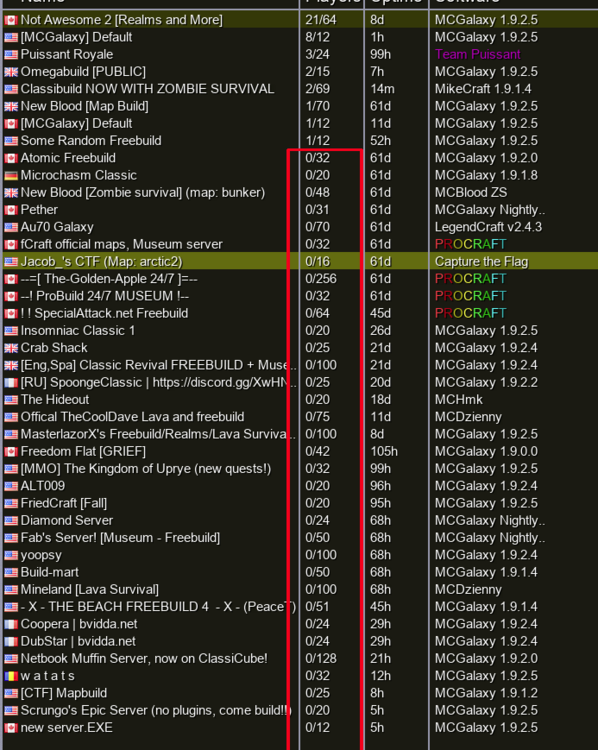
Congrats on being a manipulative troll. Want a prize? I also never said they shouldn't be added to either. Obviously those servers are unique. I'm not talking about those ones. The red rectangle was pointing out the fact that most servers are empty.
-
Nowhere did I state that those servers should be deleted. Try again (or don't ;).
-
It's not true that the more servers there are the more variety there is to choose from because 99% of people just make the exact same freebuild server with nothing special. The reason I assumed it would be the same as all the others, and therefore pointless, is because it's very obvious this person is a kid who doesn't have the skills to make something unique, which is why they were asking someone else to host and couldn't do it themselves. Unfortunately the reality of ClassiCube is that it takes a good bit of programming and/or artistic knowledge to actually make a server that does anything unique, because the server software comes with a limited set of things it can do, which have all been done to death already. If the game actually had enough population that a lot of servers were getting full, I'd say sure add more servers that do the same thing. But the reality is we're nowhere close to that population overflow. In lieu of that, the list of servers outlined in red doesn't need to be added to. It just makes the game look more dead.
-
So you want to temporarily use a different skin somewhere but not change your global account skin? You can do /skin [name of player] or /skin [link to skin]
-
Can you reword this question? It's pretty confusing. (is it actually a question?) But you are correct that you need to save a skin on your PC before you can upload it.
-
https://github.com/NotAwesome2/MCGalaxy-CustomModels/wiki
-
"Can someone do all the hard work for me so I can be owner of yet another pointless server"
-
Matthew's solution isn't quite complete because you can't erase solid (like blue wool) portals that way. You can use the /delete command to erase any blocks that normally regenerate when you break them, like doors, portals, and message blocks. Also, any build command will overwrite them as well, such as /z air (my preferred option since /delete is a toggle and can be left on accidentally)
-
It should be noted that classicube skins are case sensitive. "andrewph.png" for example would not work.
-
If you're using MCGalaxy, you can name a .lvl file with its dimensions at the end (e.g. myworld_256_256_128.lvl) , then open that file with an old version of MCedit and import a schematic file. The last dimension in the filename should be the height I believe. https://github.com/Khroki/mcedit-old/releases/tag/0.1.5
-
Here's a few of the "mods" (plugins) for ClassiCube. Instructions are given on the pages. https://github.com/SpiralP/classicube-cef-loader-plugin https://github.com/UnknownShadow200/ClassiCube-Plugins
-
Read the bot guide (MCGalaxy server software only) https://dl.dropboxusercontent.com/s/xo32vdixxcboouz/Bots.txt
-
There's a couple things you can do. First could be to use /ignore on them. Not sure why you say you couldn't block him. Secondly, and this is a better option in my opinion, you could instead play on servers that have active staff that are willing to ban bigots and trolls.
-
What you're referring to are custom "physics" blocks, such as doors, portals, message blocks, etc. You can't hold physics blocks that come with MCGalaxy. But you can place them with building commands (e.g. /place zombie) or bind a block you can place to it (e.g. /bind sponge zombie), then place sponge to become the custom block. Or try building with a substitute block then "/replace sponge door" when finished. Also, if you're using doors or zombies, in order for them to work, you need physics to be on, such as /physics 5 (for doors only) or /physics 1