DeetPlayer
Glod Menbie
-
Joined
-
Last visited
Everything posted by DeetPlayer
-
 And also the warning message while replying to posts say: OH SNAP! Think before you post that probably makes more sense but its still another warning message
 -
I remember when I was new on the classicube forums (I'm kind of still new even though I've been here for almost 2 years) when I was about to make my first post and seeing a warning sign just above the edit section and with a red, blinking font that said: I got really confused and thought "am I going to get banned for posting?", and then I saw the rules and guideline stuff and realized I was just being paranoid. The rest of the year I became inactive and didn't get banned, great success. Imagine I post this on the wrong place, that would be silly.
-
You can play minecraft servers in s-0.30 (survival mode). You can't play surival mode on classicube
-
Hello there! Classicube client doesn't have any survival mode The only possible thing is to join a multiplayer server on survival mode or be on singleplayer Here's a screenshot of multiplayer survival mode The only impossible thing is to get survival mode on classicube and/or join classicube servers on survival mode

-
-
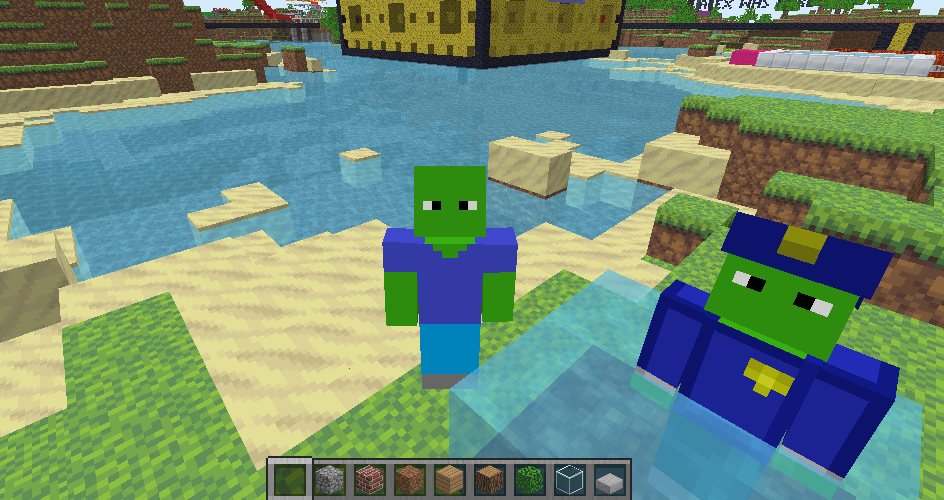
Today i was playing a Minecraft Classic (Not classicube) server, then I realized everyone except me were using classicube. I was very confused seeing non-operator people flying aroud like if it was nothing and since i was on minecraft, I couldnt fly. Then I realized they were using Classicube and I asked myself: "How did they join on Classicube?" Then icanttellyou told me that the same server is also on Classicube's server list. I was more confused on how they could send heartbeat to two separate places. Another player told me the server had a "Dual heartbeat", then an idea got into my head. Since my minecraft account and classicube account have separate names i joined on both minecraft and classicube to the same server and I went nuts.
-
-
-
-
-
-
Today, I made a new server that is a survival server and it got very funny If you are going to join you need to know this: - Player "doki" flodded the old main world - Use /craft to craft - There were portals that take you to different worlds (but got destroyed) - The crafting table is useless - The server is I have no screenshots because I closed the server before realizing it
-
So I own two servers and I need to know how to be able to make the players be able to chat between the two servers maybe a plugin, maybe code. I need to know
-
If you invert cobblestone's texture. You'll get endstone
-
what version of server and software you use ?
-
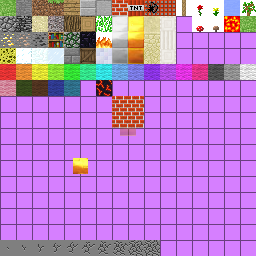
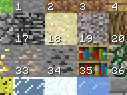
(If you won't add textures skip to step 3) Requirements: - Copy paste knowledge - Acces to classicube files - A program to open .zip files - paint.net or gimp (Don't use Microsoft paint /3D or the transparency will be gone from the entire image) - A classicube server with /gb or /lb and textures (in my case I use MCGalaxy) Step 1: Creating the texture First, you need to get the textures to be able to modify them. Go to the folder where all your classicube files are. There try to find a folder named: In there is a file named: Copy the file and paste it into your desktop or anywhere else that is not in the classicube files. Open with the program you use to open .zip file. There, try to find and extract the file from . Open and start editing. To create a new texture replace with the texture/textures you will add (If you will add an animation read to understand how to add animations work) After adding the texture save the changes and takeagain inside in and upload to google drive or anything else Step 2: Enable the textures Go to you server's files In your server's files go to and in the folder find Open the file and find: Set the url with the url of the place you uploaded Start the server and join your server Step 3: Block creation The server will ask you if you want to use their textures. If not, press F10 to check if the textures are enabled To add the block in a specific level use /lb. To add the block in the entire the server use /gb then use /gb add then /gb (name of the block) then /gb 0 if it is a solid block like stone or type /gb 1 if its a sprite like flowers It will ask for textures of the block. To know wich texture is wich press F10. Each one has its own texture id EXAMPLE: The bedrock texture has an ID of 17 The other things /gb will explain to you Reply to this if you need help







-
-
-
Today I could finally port foward so anyone can join and play my server Now the people can ask me quiestions about my server or tell me to add something like a block or suggestions to make my server better If you want to join my server It's named ClassicLands The server will be open today, and tomorrow and will be closed until Tuesday http://www.classicube.net/server/play/703d1984486cba0cf6c0a1603e9a4b75/
-
-
I finally could port foward and got the classicube url, I joined the classicube url and found this: Why would I connect to 127.0.0.1????? (classicube's localhost) Don't reply with an answer because I know how to fix it Classicube gave me this URL but it won't take you to 127.0.0.1, it will take you to my server (The URL won't work anymore, not even my server) http://www.classicube.net/server/play/703d1984486cba0cf6c0a1603e9a4b75/

-
-
-
You can enter your server easily, but other players to enter need that your server is port fowarded wich not everyone can do
-