




jshtab
Glod Menbie
-
Joined
-
Last visited
Everything posted by jshtab
-
 I can confirm that X-Ray is quite useful on Survival servers, to find Diamonds. Aomeix is right, you need to change the blockdraw modes of Stone, and on some Survival servers you also need to disable the lava fog that stops you from seeing through Stone when using Noclip. That can't be done with a texture pack, only a cheat client.
 -
You can already run MCGalaxy on most operating systems by installing Mono, which provides a loader for Common Language Infrastructure (CLI) and an implementation of the .NET API. It works for Linux, macOS and BSD. I'm not too sure about iOS, but on Android it's theoretically possible. It is... not wise to run a server on a mobile phone or tablet, though. ☹️
-
Hi, just a reminder that Freexian is ending support for Debian 9 "stretch" next year in 2027, and you should update before it is left completely unsupported. The main repositories in Debian 13 "trixie" (the current stable release) provides Mono 6.12.0.199, which works to run MCGalaxy. The Official LTS period for Debian releases has been increased to 5 years, so free support of Debian 13 will last until 2030, with Freexian support into 2035. Good Luck.
-
classic.parknich.xyz has now split into an new anarchy server called anarchy.parknich.xyz which allows botting while the old server now has rules that prevent botting. There was some minor grumping involved in this change (that used to exist in this post) but now everyone seems satisfied with this solution. Yay!
-
TIL Cat Flu is a thing. Thanks YETI.
-
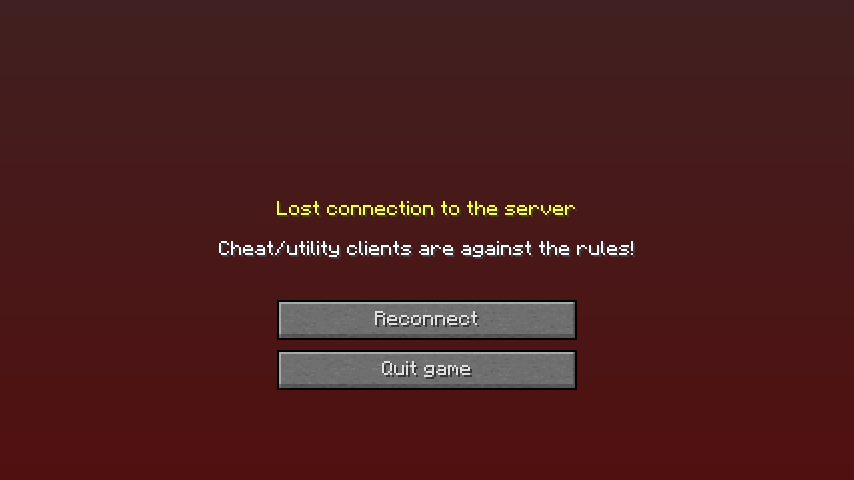
Coming back to this thread after a few months, and server owners and plugin developers have started to recognize the +hax marker in AppNames when joining. I've come across it several times during the summer that some servers started to block it. The most notable example is Goold old Lava Survival, which gives you this when you join with a +hax'd client.
-
I personally draw the line between client and bot based on whether it is primary controlled by a human able to reply to players in the server. Many clients have a cuboid function which takes control over your position and block placement, but do not interrupt your ability to chat or cancel the action. Bots are headless, they're usually controlled text-only interfaces and operate autonomously by default. It is possible to make a bot that operates on its own, but then its operator can log in and take full control of the bot's session. In that situation, I think it should continue to be considered a Bot, even if there is currently a human at the wheel. There's also the UB in the CPE specification about sending the ExtInfo (packet number 16) outside of the Handshake. In MCGalaxy, sending this packet after the handshake changes your AppName immedately and without a crash. Therefore, when a "Selfbot" switches into being a Bot, it could change its AppName on the fly to clearly be a Bot, and then when the human resumes control, switch back to being a client. That's a good Bad Apple, but remember that this thread's main topic is about client-side cheats and hacks. Your TAS plugin fits the topic very well though. Can you elaborate on it more, how it works, and what sort of state it's in?
-
We should all have some sort of visible marker in our clients that they are cheats/botsGoing to be double-posting to my own thread, but here's a prompt towards some needed discussion, for people who are into that. We should mark our cheats as cheats, especially if we give out source code or binaries. It is polite to allow admins to kick unwelcome cheaters the moment they connect. I have been placing +hax in my AppName for a while now, similar to how plugins advertise themselves. It's not difficult to brand your cheats in this way. If your cheats are based around ClassiCube, it's as quick as adding this little snippet to Game_Load or the GameComponent OnInit function: static void OnInit(void) { String_AppendConst(&Server.AppName, " +hax"); // ... } struct IGameComponent PlusHacks_Component = {OnInit};Simpler still is changing the GAME_APP_NAME macro on src/Constants.h:17 #define GAME_APP_TITLE "ClassiCube 1.3.7 +hax"The same sort of thinking should apply to proxies and especially bots. They should support the CPE handshake if only to set their AppName to something conspicuous. Proposed CPE AppName conventionsFor cheat clients, it should be the vendor of the client, followed by +hax ClassiCube 1.3.7 modified to be a cheat client, should use the AppName: ClassiCube 1.3.7 +hax Some unique vendor which always ignored MOTD controls or HacksControl should include +hax in the name: Mugwort 1.0 +hax For bots, they should be prefixed with Bot followed by the software vendor and/or the author/controller of the bot Bots operated by SuperZPMax should have the AppName: Bot (SuperZPMax) If a bot has a vendor name like "SuperBot" and it is run by a user named Testificate, it should have the AppName Bot/SuperBot (Testificate)
-
NEVER POST ANYTHING LIKE THIS IN THIS THREAD, EVER Inane single-world replies like "cool" or "wow how did you code that" — That's what reactions are for, use them! Don't ask for tech-support with learning the C Programming Language Mope about how burnt out you are and how you have this great idea but not sure if anyone would like it — Just make things already! Do not boast about griefing, cyber-crime, infiltrating people's accounts and expect praise — We are programmers, not mouth-breathing skiddies Don't post about how you disabled HacksControl, or +hax MOTD toggles — Everyone already knows how to do this, it's a one-line change What's the point of this thread?There's a small group of ClassiCube players who "play" the game by making modified clients, bots, man-in-the-middle proxies and in general: client-side hax. Not just using off-the-shelf cheat clients, but actually writing our own that do cool and unique things. Most of the time, we clump together in a random server for a few hours and show off our recent work, but sometimes we miss something awesome. This thread is for boasting about cool cheats that you have made, sharing source code, tips, tricks, and just yapping about cheats in general. Keep the signal-to-noise ratio high, and be polite and thoughtful. Cool things people already made@Rainb0wSkeppy's bot playing Bad Apple by rapidly placing blocks (not a server-side plugin; this video is speed up about 15% to sync with the original video, filmed on Ephemera Anarchy) https://files.catbox.moe/kccj27.mp4 @jshtab's copy+paste feature in their modified client https://files.catbox.moe/ehehwc.webm Wall of Dangerous and Potentially Interested Programmers@SuperZPMax @morgana @Icee_ @AAA59 @Alland20201 @FavoritoHJS @HarmonyNetwork
-
You were there, Skeppy. Ephemera was just a freebuild with a gimmick, and after a while, that gimmick wore off and people stopped showing up for a week and I killed the server. I know it was great for testing bots and making big generated displays, but in the end it didn't succeed. If you want to revive ephemera, you can get the source code and run it yourself. It just needs Python 3.9 or newer (although I only tested it on 3.11)
-
The Classic Protocol Extension system is quite flexible (it's been expanded at least 37 times). While whatever features you introduce probably won't be accepted upstream, you can absolutely make a client that works on both normal ClassiCube and your custom modified version. Spec out a non-standard extension. When players connect to a FPS server, they get kicked if they don't declare support for it. Alternatively, you can gracefully fall back to simpler behavior when a player doesn't support your magic features. With non-standard extensions I made (none of which went anywhere, sorry), I always prefixed them so they'd never clash with the standard, much like HTTP Headers. Something like "X-classi3-InfiniteMap" wouldn't conflict with the standard, and wouldn't conflict with other non-standard extensions made for other servers. All this being said, modding ClassiCube into what is essentially a different game, with it's own separate and custom client, and then using the main classicube.net server index to announce and play it, doesn't feel particularly in line with the soul of the game. Many players will try to join, realize you need an extra download, and feel like they're missing out. Won't help that most chromies are literally incapable of installing a custom client. At some point, there's no reason to keep using the old and crunchy network protocol, since you won't be interoperating with the main client anyway. If for some reason, you still want to go forward, I feel you'd get better results forking this into a separate project, maybe it's own dedicated server list. You can still announce your servers on the main index. Although, it would be best if you kept them off the public list and instead linked to the server IDs on your own index/website instead. That way players with CC accounts can join your server. Further down that path is becoming your own player and server tracker. Several CC servers accept players from BetaCraft, which uses Mojang accounts instead of ClassiCube accounts. This leaves the door for still allowing users from CC to join through private server IDs without having to register on your service. ClassiCube also has an OAuth system (which is used for this forum!) that you could potentially use to allow quick sign-in without forcing players to re-register for the new one. Ask AndrewPH about it, if and when you're serious about doing something like that. TLDR: You're making a completely new game. There are many options, if you decide to use ClassiCube as the basis for your project. Doing any of them is a large amount of work and dedication, just to stay connected to the community in some way. At some point, you're better off writing your game from scratch.
-
Can't replicate this crash on Debian 12.5 i386 DVD installed on QEMU x86_64 when compiling the game from source, or using the binaries on the website. Screenshot_20240414_112934.webp Reyna should continue working with Unk for now, since this can easily be something specific to their exact CPU or glibc version.
-
Probably will only work with realms or with the default chat.
-
REPLY MUST INCLUDE: Pictures of your model (in Blockbench or in-game) Any skins / skin templates Attachment / Link to a bbmodel and/or Model name on NA2 (preferably both or just a bbmodel) QUICK START GUIDE FOR MAKING MODELS: Download the humanoid templates here. Pick the bbmodel for the skin size you want/ Open Blockbench ( download - webapp ) Load that bbmodel into Blockbench Read the full guide for comprehensive info on making models. ???? Profit; you have a custom model, save it. HOW TO UPLOAD?????!! To upload it to NA2, run the following command: /cm upload username+ [link] Where username is your in-game username, and [link] is a link to your bbmodel. It's probably best to upload the model to discord or dropbox and use that link. When your done, the command should look something like this: /cm upload jshtab+ https://cdn.discordapp.com/attachments/590513227377541120/700000000000000000/example.bbmodel Apply the model by running: /model username+ i.e. /model jshtab+
-
You need to port forward your server. Same as any other game server that you host yourself.
-
-
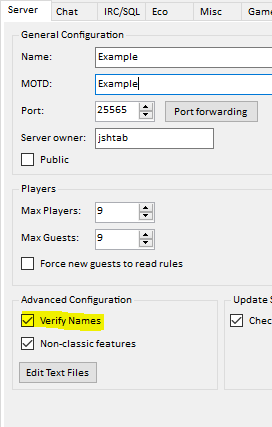
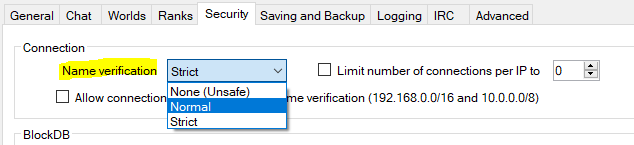
Username Verification is a process used to establish a player's identity on a ClassiCube server, and ensures that the player connecting is who they say they are. When running servers, it is important that you enable this feature, especially when running public servers advertised on the ClassiCube server tracker. Leaving it disabled is a major security risk, and malicious players can: Impersonate you, your administrators, and other players on the server Easily and quickly evade name-based bans Kick other players out of the server (See "Collision Kicking" below) How do I enable Username Verification? Thankfully, on most server software, username verification is enabled by default. But, if you accidentally turned it off and cannot find where the option is located, this section will help you! MCGalaxy In MCGalaxy, the name verification option can be found in Settings > Server in the section "Advanced Configuration" ProCraft In ProCraft, the name verification option can be found in the Security tab in the section "Connection" PyCCS (alpha) In PyCCS 0.1.0+, the name verification flag can be enabled by setting 'verify_names' to True when constructing the Server object # PyCCS 0.1.0+ server = Server(verify_names=True) SHAMELESS SELF-PLUG: Try this (unfinished) ClassiCube server today! It's in Alpha and can be found here Collision Kicking Mentioned previously in this post, Collision Kicking occurs when a player with the same name attempts to join a server. On certain servers, joining as someone already connected to the server will result in the player connecting first being removed from the server. With name verification, the player currently logged in will not be kicked, since the connecting player could not be verified. Without name verification, a player can be effectively banned from a server by others by repeatedly reconnecting as them to prevent them from playing on the server. How it works The server tracker employs a simple trick of cryptography in order to prove to the server that the player connecting is who they say they are. When you log into ClassiCube.net, you create a session which allows the game client to make requests on your behalf. During this session, the game client asks ClassiCube.net for a list of servers, which contains the IP to connect to, along with a string of (seemingly) random characters called the "mppass". When connecting to the server, the game client gives the server your username, and this mppass. This allows the server to verify that you are in fact logged into ClassiCube.net What is the mppass? The mppass is actually a MD5 Checksum, a string of letters that is easy to compute given the original text, but (usually) impossible given only the resulting string of characters. The original text of the mppass consists of both the username of the player connecting, and the 'salt' provided by the server to the server tracker. This salt is a random series of characters which is kept as a shared secret between the server and provider, and is never actually given to the client. # Input String (server's salt + your username) kuqL3HHSbOVkzOZRjit983D9Vw5M3zEMjshtab # Resulting mppass 8e0aa02498370cc26807df70d795fdcd When you request a list of servers from the tracker, the tracker quickly generates the mppass by putting your username at the end of that server's salt and running it through the MD5 algorithm. When you connect, the server does the same with your username and it's own salt. If the two strings match, then you are verified to be logged in to the server tracker, since the only way you could've gotten a valid mppass was through the server tracker.
-



