Jump to content
View in the app

A better way to browse. Learn more.

ClassiCube Forum

A full-screen app on your home screen with push notifications, badges and more.

To install this app on iOS and iPadOS
  1. Tap the Share icon in Safari
  2. Scroll the menu and tap Add to Home Screen.
  3. Tap Add in the top-right corner.
To install this app on Android
  1. Tap the 3-dot menu (⋮) in the top-right corner of the browser.
  2. Tap Add to Home screen or Install app.
  3. Confirm by tapping Install.

Duplicate player

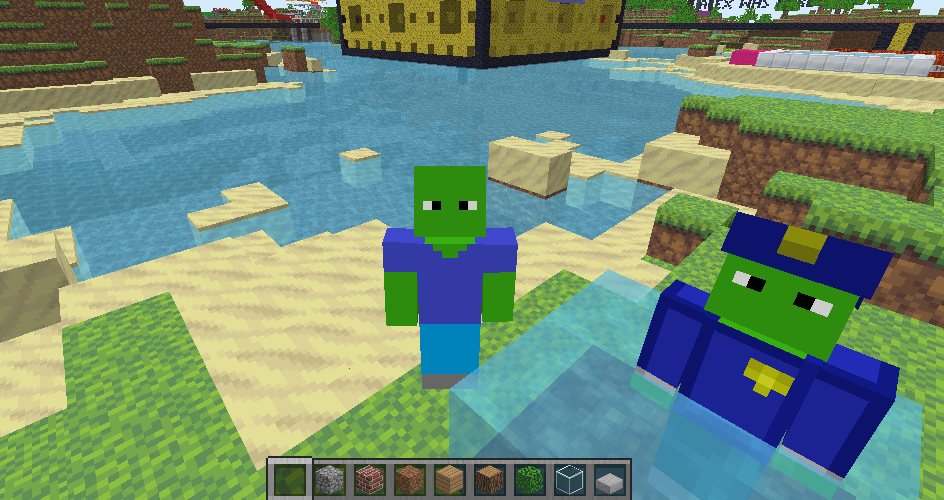
Today i was playing a Minecraft Classic (Not classicube) server, then I realized everyone except me were using classicube. I was very confused seeing non-operator people flying aroud like if it was nothing and since i was on minecraft, I couldnt fly. Then I realized they were using Classicube and I asked myself: "How did they join on Classicube?" Then icanttellyou told me that the same server is also on Classicube's server list. I was more confused on how they could send heartbeat to two separate places. Another player told me the server had a "Dual heartbeat", then an idea got into my head. Since my minecraft account and classicube account have separate names i joined on both minecraft and classicube  to the same server and I went nuts.Duplicates.png.0def5877510d566253f940008453bfb8.png

Edited by DeetPlayer
grammar

Featured Replies

  • Glodden Godd

where did you find the minecraft classic servers?

I honestly don't see the point in playing mc classic when you can just use the original classic textures on a cc map and play it on cc to give an experience that's basically just as authentic, and will run faster bc it's written in C instead of Java

  • 1 month later...
  • Author

So, if you didn't know what server was the one I got dupliacted. Its Classicalnuts you can find in on Classicube server list and also Betacraft server list

Archived

This topic is now archived and is closed to further replies.

Configure browser push notifications

Chrome (Android)
  1. Tap the lock icon next to the address bar.
  2. Tap Permissions → Notifications.
  3. Adjust your preference.
Chrome (Desktop)
  1. Click the padlock icon in the address bar.
  2. Select Site settings.
  3. Find Notifications and adjust your preference.