Jump to content
View in the app

A better way to browse. Learn more.

ClassiCube Forum

A full-screen app on your home screen with push notifications, badges and more.

To install this app on iOS and iPadOS
  1. Tap the Share icon in Safari
  2. Scroll the menu and tap Add to Home Screen.
  3. Tap Add in the top-right corner.
To install this app on Android
  1. Tap the 3-dot menu (⋮) in the top-right corner of the browser.
  2. Tap Add to Home screen or Install app.
  3. Confirm by tapping Install.

Can't join my port forwarded server.

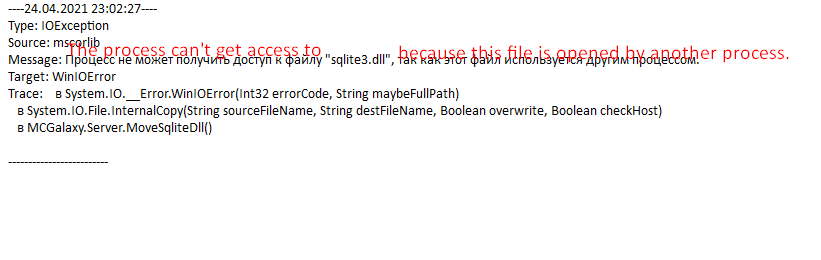
I forwarder port for my server, but I still can't join. When attempting to join the server, the message is default: "Can't join the server, it's probably down!". The only problem that I see in server console is this:
image.png.d19f9704670a63ab3638bf347ba886af.png


And in logs:
image.png.6ee46960b76ee9a3b8501e3ca1657c09.png

Edited by Archeed

Featured Replies

  • Author
13 hours ago, Panda said:

By chance, do you have more than one instance of the server running? You should be able to check in your Task Manager processes tab.

image.png.faf8f3ea1920f51488babcd60d46c82a.png

Now there are no errors, but I still can't connect to my server from classicube client. The only way to connect is through web client.

13 minutes ago, Archeed said:

image.png.faf8f3ea1920f51488babcd60d46c82a.png

Now there are no errors, but I still can't connect to my server from classicube client. The only way to connect is through web client.

Copy the URL which shows up (classicube.net/server/play/...)

Sign in on the desktop client

Paste the url here: image.png.73fe21b7984c15fadf0f33c408820353.png

Press Connect

  • Author
3 minutes ago, aleksb385 said:

Copy the URL which shows up (classicube.net/server/play/...)

Sign in on the desktop client

Paste the url here: image.png.73fe21b7984c15fadf0f33c408820353.png

Press Connect

I still can't connect. It shows the same message "can't connect to the server, it's probably down"
Other people are able to join it, I see someone joined it.

Just now, Archeed said:

I still can't connect. It shows the same message "can't connect to the server, it's probably down"
Other people are able to join it, I see someone joined it.

Ah right, my bad. Without signing in, click "Direct connect" in the client and enter your username, your local IP (127.0.0.1 should work) and nothing on mppass

  • Author
54 minutes ago, aleksb385 said:

Ah right, my bad. Without signing in, click "Direct connect" in the client and enter your username, your local IP (127.0.0.1 should work) and nothing on mppass

Thank you, it seems to work. 

Archived

This topic is now archived and is closed to further replies.

Configure browser push notifications

Chrome (Android)
  1. Tap the lock icon next to the address bar.
  2. Tap Permissions → Notifications.
  3. Adjust your preference.
Chrome (Desktop)
  1. Click the padlock icon in the address bar.
  2. Select Site settings.
  3. Find Notifications and adjust your preference.