



RainZhang
Member
-
Joined
-
Last visited
Everything posted by RainZhang
-
 Well, actually there is. You can add this command to your server (Link: https://github.com/NotAwesome2/Commands?tab=readme-ov-file#cmdboostcs), which will boost you up into the air when you run it or click a MB containing it. And having these custom blocks by default wouldn't go because this isn't some random Minecraft clone, it's replicating Minecraft Classic, which doesn't contain any blocks that you have mentioned.
 -
Because it gives a secret award and if someone finds it in /help and runs it, then they wouldn't have 'earned' that award.
-
I have a secret command on MCGalaxy, but I want to hide it from people so they can't do /help on it or accidentally find the command. Also, as a bonus, is there a way to prevent them from using / again to see the command?
-
I have a server at InfiniBuild, and I accidentally deleted all of the ranks and redid the perms and changed the commands to their respective ranks, it shows usable by 50+ when in the settings it shows usable by Guest. Can anyone help with this problem?
-
Have you heard of something called 'Tact'?
-
That fixed it, thanks!
-
Now there's this error when using /giveinsane [user]: !!!Error (Object reference not set to an instance of an object) - See Logs tab for more details The logs show this longer version: Type: NullReferenceException Source: MCGalaxy_ Message: Object reference not set to an instance of an object Trace: at MCGalaxy.Extensions.CaselessContains (System.Collections.Generic.List`1[T] items, System.String value) [0x00000] in <f309205a56554c158910ca5ef34fa632>:0 at CmdGiveinsane.Use (MCGalaxy.Player p, System.String message) [0x0000c] in <5bd5b930cfd5436dbb6e2f13c1219d68>:0 at MCGalaxy.UI.UIHelpers+<>c__DisplayClass3_0.<HandleCommand>b__0 () [0x00000] in <f309205a56554c158910ca5ef34fa632>:0 Please help! BTW, source code for reference attached CmdGiveInsane.cs
-
I'm trying to use /compile on a custom command I made in MCGalaxy, and when I try to compile the below code(C#), it shows this error: Error #CS1525 on line 3 - Unexpected symbol 'void', expecting 'class', 'delegate', 'enum', interface', 'partial', 'ref', or 'struct' Code: using MCGalaxy.Modules.Awards; public override void Use(Player p, string message) { const string myAward = "Insane"; bool hasAwardAlready = PlayerAwards.Get(p.name).CaselessContains(myAward); if (hasAwardAlready) { p.Message("You have already claimed this award!"); return; // When we write return, that will quit running the command so that the code below doesn't run } //Give the player the award if they haven't already gotten it Command.Find("award").Use(Player.Console, "give "+p.name+" "+myAward); }
-
-
-
-
-
-
I want to make all blocks in one map available in the others, as in that level's blocks become the default global blocks. I tried changing the blockdefs file name of that level to global.json, but when I reloaded the server, every block was strange, even the ones in the map where the blockdefs file originated. Is there an easier way and if not, how do you do fix this?
-
-
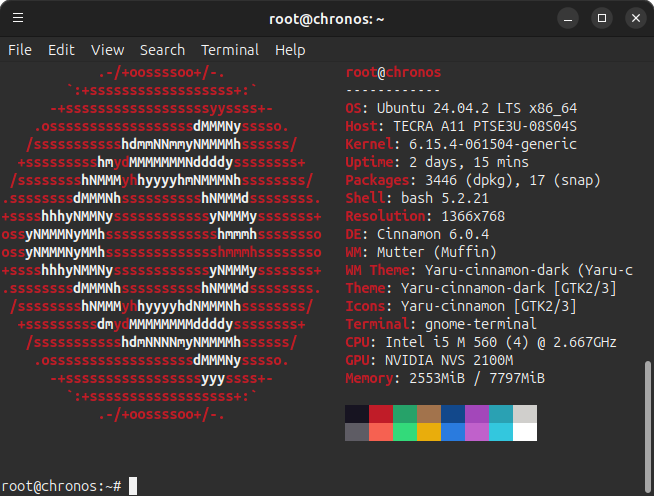
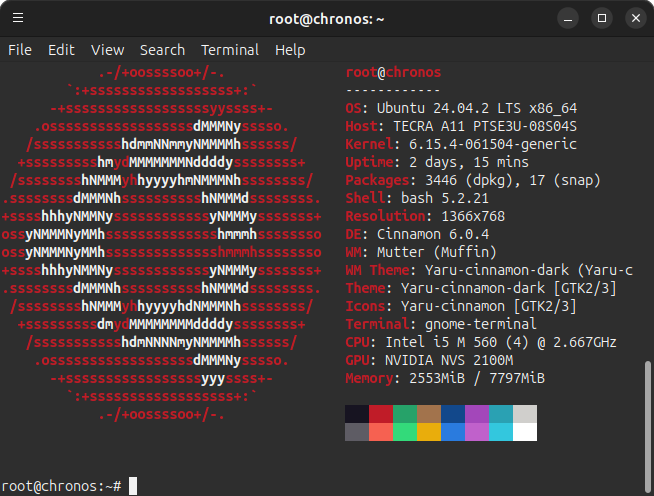
I'm on MCGalaxy 1.9.5.3, I did /update latest, and I want to add more custom blocks (more than 255) without having to rebuild the server (create everything again). I tried switching the MCGalaxy_.dll file with the MCGalaxy_infid.dll and renamed the latter to MCGalaxy_.dll and moved the original away, and it doesn't start. System specs are attached.
-
Recently upgraded to 8GB of RAM.
-
-
-
This error shows when uploading my texpack on https://garbage.loan: Zip file must contain any of the following: animations.png, animations.txt, char.png, clouds.png, default.png, gui.png, icons.png, particles.png, rain.png, snow.png, terrain.png, touch.png, skybox.png But my file contains the following (After unzipping): animations.png clouds.png icons.png readme.txt touch.png animations.txt default.png particles.png snow.png char.png gui.png rain.png terrain.png File attached for reference, any help would be appreciated! classicube.zip
-
This error shows when uploading my texpack on https://garbage.loan: Zip file must contain any of the following: animations.png, animations.txt, char.png, clouds.png, default.png, gui.png, icons.png, particles.png, rain.png, snow.png, terrain.png, touch.png, skybox.png But my file contains the following (After unzipping): animations.png clouds.png icons.png readme.txt touch.png animations.txt default.png particles.png snow.png char.png gui.png rain.png terrain.png File attached for reference, any help would be appreciated! classicube.zip
-
Thanks! You helped me a lot. Have a nice day!
-
Thanks for the first tip. I tried pcompiling again and here's the error message. Error #CS0006 - Metadata file `System.Core.dll' could not be found Compiling failed. See logs/errors/compiler.log for more detail As for the second tip, the compile worked successfully. By the way, I noticed there was no .mdb file when I compiled it using mcs. Is the .mdb file crucial for _extralevelprops.dll & GoodlyEffects.dll? Thanks.
-
Answering your first question, it didn't say anything except for Plugin compiled successfully from GoodlyEffects.cs (console) used /Compile plugin GoodlyEffects. As for your second question, I tried that. It said error CS2005: Missing file specification for `/r:' option. Input for reference: mcs -target:library -r:MCGalaxy_.dll -target:library -r: _extralevelprops.dll -out:plugins/GoodlyEffects.dll plugins/GoodlyEffects.cs. Edit: I also ran this with the same effect. mcs -target:library -r:MCGalaxy_.dll -r: _extralevelprops.dll -out:plugins/GoodlyEffects.dll plugins/GoodlyEffects.cs.
-
I'm making a server for testing purposes, and I want to use the GoodlyEffects plugin. (See https://github.com/ClassiCube/MCGalaxy-Plugins/blob/master/documentation/GoodlyEffects.md) When I use /pcompile GoodlyEffects (In MCGalaxy) though, the .dll file doesn't appear. So I use mcs -target:library -r:MCGalaxy_.dll -out:plugins/GoodlyEffects.dll plugins/GoodlyEffects.cs. (Ubuntu 24.04) And then this error appears: plugins/GoodlyEffects.cs(19,7): error CS0246: The type or namespace name `ExtraLevelProps' could not be found. Are you missing an assembly reference? The ExtraLevelProps dll is there. Is this problem fixable and can you tell me how to fix it? Thanks in advance.


