Jump to content
View in the app

A better way to browse. Learn more.

ClassiCube Forum

A full-screen app on your home screen with push notifications, badges and more.

To install this app on iOS and iPadOS
  1. Tap the Share icon in Safari
  2. Scroll the menu and tap Add to Home Screen.
  3. Tap Add in the top-right corner.
To install this app on Android
  1. Tap the 3-dot menu (⋮) in the top-right corner of the browser.
  2. Tap Add to Home screen or Install app.
  3. Confirm by tapping Install.

Contest.

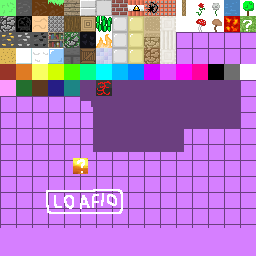
Whoever makes a good 128x128 version of my terrain pack gets 10 coins in NA2! 1302860150_loafiospackwithupdatedgraphics.png.96907a424abedcf1b14364de74f4674d.png

Featured Replies

I am quite literally a genius. I'll be waiting for my 10 coins now

image.thumb.png.39f84b0af8e9dc49e87da65225beb4b8.png

the joke explained: why would i put effort in upscaling textures for ten coins

Edited by Yolkbird

  • Author
7 hours ago, Yolkbird said:

I am quite literally a genius. I'll be waiting for my 10 coins now

image.thumb.png.39f84b0af8e9dc49e87da65225beb4b8.png

the joke explained: why would i put effort in upscaling textures for ten coins

I meant: remake it like the faithful texture pack did

10 coins?? ripoff much. It should cost more like 1,000 coins tbh.

  • Author
On 1/19/2021 at 5:40 AM, bubblepop said:

10 coins?? ripoff much. It should cost more like 1,000 coins tbh.

I only have 165 coins.

Edited by stevebrine

the thing is, nobody would like 10 coins to recreate a texture pack. its like being forced to do work for 9 hours a day and getting 5 dollars. 

On 1/25/2021 at 12:42 AM, bubblepop said:

the thing is, nobody would like 10 coins to recreate a texture pack. its like being forced to do work for 9 hours a day and getting 5 dollars. 

its 5 dollars tho, i would get it ngl

Archived

This topic is now archived and is closed to further replies.

Configure browser push notifications

Chrome (Android)
  1. Tap the lock icon next to the address bar.
  2. Tap Permissions → Notifications.
  3. Adjust your preference.
Chrome (Desktop)
  1. Click the padlock icon in the address bar.
  2. Select Site settings.
  3. Find Notifications and adjust your preference.