Jump to content
View in the app

A better way to browse. Learn more.

ClassiCube Forum

A full-screen app on your home screen with push notifications, badges and more.

To install this app on iOS and iPadOS
  1. Tap the Share icon in Safari
  2. Scroll the menu and tap Add to Home Screen.
  3. Tap Add in the top-right corner.
To install this app on Android
  1. Tap the 3-dot menu (⋮) in the top-right corner of the browser.
  2. Tap Add to Home screen or Install app.
  3. Confirm by tapping Install.

cant join classicube discord server

Solved by Panda

Go to solution

Featured Replies

2 minutes ago, Rainb0wSkeppy said:

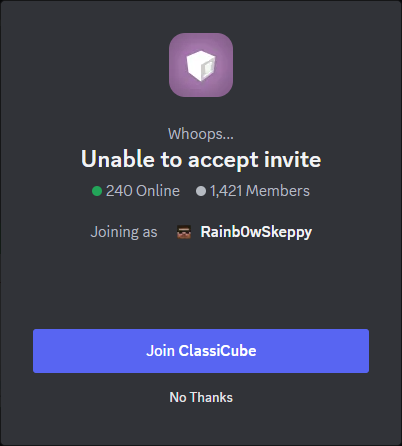
help i cant join the classicube discord server
never_gonna_give_you_up.png.549a474a503e8b2d3ceced9e59da394f.png
 

Were you banned previously for any reason?

  • Administrator
  • Solution
17 minutes ago, Rainb0wSkeppy said:

yes but idk why

Your Discord account Rainb0wSkeppy#0875 was banned from the Discord server for both leaking player IPs and flooding the server chats. Unfortunately there is not a process for appealing your Discord ban at this time. If you have further questions regarding this incident, please feel free to direct message a staff member.


  • Panda locked this topic

READ THE RULES BEFORE YOU POST

Guest
This topic is now closed to further replies.

Configure browser push notifications

Chrome (Android)
  1. Tap the lock icon next to the address bar.
  2. Tap Permissions → Notifications.
  3. Adjust your preference.
Chrome (Desktop)
  1. Click the padlock icon in the address bar.
  2. Select Site settings.
  3. Find Notifications and adjust your preference.