Jump to content
View in the app

A better way to browse. Learn more.

ClassiCube Forum

A full-screen app on your home screen with push notifications, badges and more.

To install this app on iOS and iPadOS
  1. Tap the Share icon in Safari
  2. Scroll the menu and tap Add to Home Screen.
  3. Tap Add in the top-right corner.
To install this app on Android
  1. Tap the 3-dot menu (⋮) in the top-right corner of the browser.
  2. Tap Add to Home screen or Install app.
  3. Confirm by tapping Install.

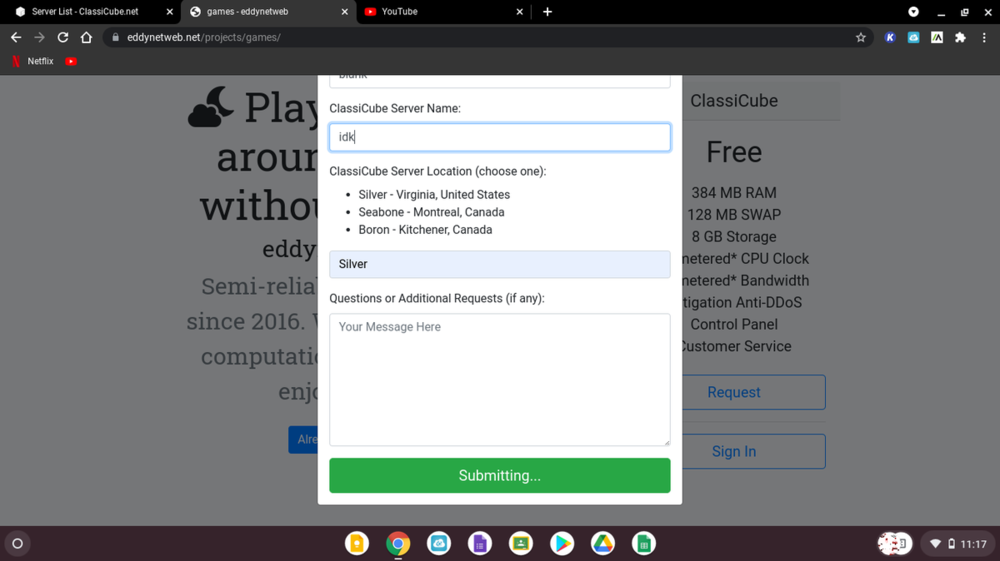
uhhhh something happend

i was trying to make a server and i press submit and this happend...

its been like 5mins for so2032827424_Screenshot2021-08-1811_17_45AM.thumb.png.a942665a144a2581b4a8eaa3f88f960b.png

i tried it again and it still does the same thing

Featured Replies

5 minutes ago, hanpy said:

i was trying to make a server and i press submit and this happend...

its been like 5mins for so2032827424_Screenshot2021-08-1811_17_45AM.thumb.png.a942665a144a2581b4a8eaa3f88f960b.png

i tried it again and it still does the same thing

perhaps refresh the page and try again?

  • Author
Just now, jviteo2005 said:

perhaps refresh the page and try again?

i already tried that

  • Author

can someone one tell me whats is happing plzzzz

10 minutes ago, hanpy said:

can someone one tell me whats is happing plzzzz

probably a bug or server problem

also i dont recommend bumping your posts like this

his name is Nagomu

image.png

  • Author
4 minutes ago, MESYETI said:

probably a bug or server problem

also i dont recommend bumping your posts like this

oof welp guess ill try net time

Archived

This topic is now archived and is closed to further replies.

Configure browser push notifications

Chrome (Android)
  1. Tap the lock icon next to the address bar.
  2. Tap Permissions → Notifications.
  3. Adjust your preference.
Chrome (Desktop)
  1. Click the padlock icon in the address bar.
  2. Select Site settings.
  3. Find Notifications and adjust your preference.