Jump to content
View in the app

A better way to browse. Learn more.

ClassiCube Forum

A full-screen app on your home screen with push notifications, badges and more.

To install this app on iOS and iPadOS
  1. Tap the Share icon in Safari
  2. Scroll the menu and tap Add to Home Screen.
  3. Tap Add in the top-right corner.
To install this app on Android
  1. Tap the 3-dot menu (⋮) in the top-right corner of the browser.
  2. Tap Add to Home screen or Install app.
  3. Confirm by tapping Install.

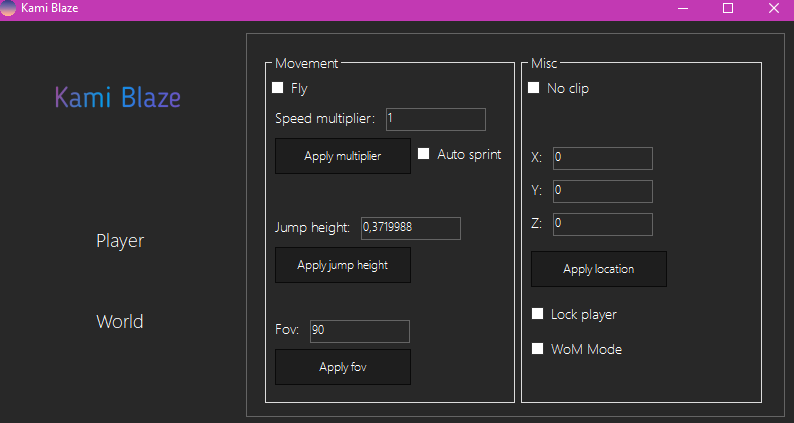
Kami Blaze - A ClassiCube saga

If you want to be legend, dm from discord and i will give you my hacked client! Btw thanks for source to fyochezWasTaken!

My discord: yeet

Screenshot_2.png.f484d839d1435beb25fb5974583dcc43.png

Featured Replies

Salca, you already got muted on New Blood: Zombie Survival. Don't you think you shouldn't get banned here as well? Please don't distribute hacked clients. FyochezwasTaken was also banned from New Blood for hacking as well. Once again, please don't distribute hacked clients, lets make the game as equal as possible. Thanks.

Why are you hacking. Also didn't you say that you were 8? Which means that you don´t make the terms of Service.

Archived

This topic is now archived and is closed to further replies.

Configure browser push notifications

Chrome (Android)
  1. Tap the lock icon next to the address bar.
  2. Tap Permissions → Notifications.
  3. Adjust your preference.
Chrome (Desktop)
  1. Click the padlock icon in the address bar.
  2. Select Site settings.
  3. Find Notifications and adjust your preference.