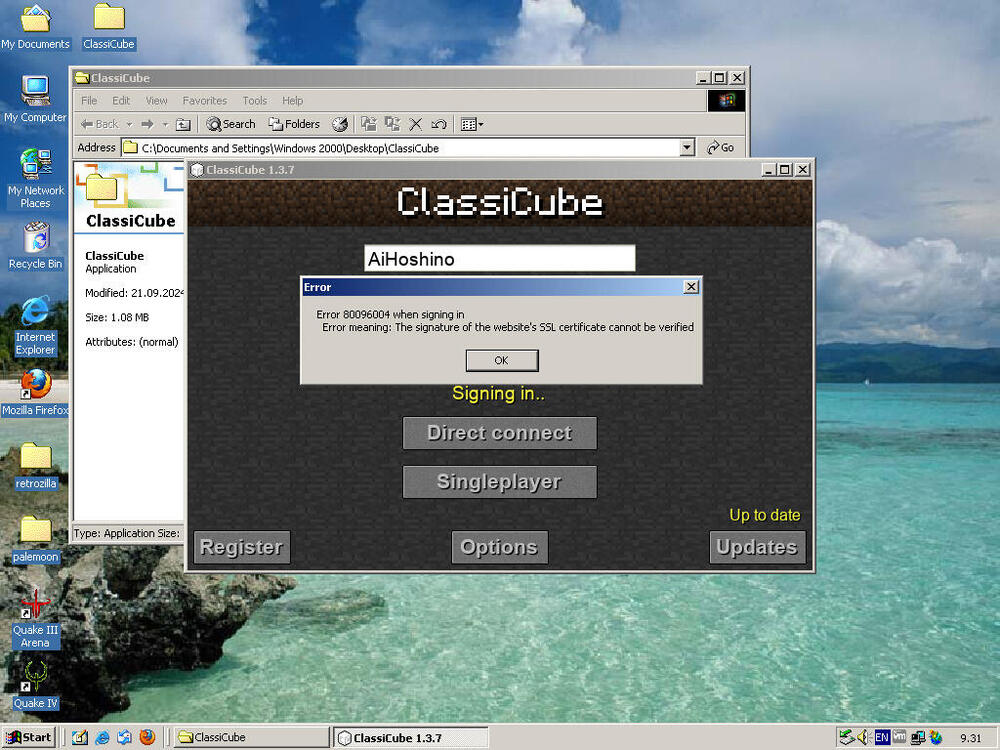
December 12, 2025Dec 12 I can't log into my ClassiCube account from Windows 2000, even after updating all required updates and root certificates. Does anybody know a fix?
December 12, 2025Dec 12 Try enabling SSL or TLS options in Internet Explorer. Alternatively, don't use Windows 2000. she/her
December 13, 2025Dec 13 Author 5 hours ago, koy said:Try enabling SSL or TLS options in Internet Explorer. Alternatively, don't use Windows 2000.I just checked the SSL and TLS options in the Internet Explorer and found them all enabled, still can't log in. Thank you for trying to help me out thoanyway, I found a fixjust to add the line "http-no-https=true" in options.txt in the ClassiCube folder and hit save
December 14, 2025Dec 14 Administrator On 12/13/2025 at 11:03 AM, AiHoshino said:just to add the line "http-no-https=true" in options.txt in the ClassiCube folder and hit savePlease don't do this, as it means your account password is transmitted in plaintext when logging in.You may want to try updating to the latest dev build, as that should fix most SSL/TLS issues. (ClassiCube in the latest dev build manually integrates SSL/TLS support, rather than relying on the operating system to do it)
December 16, 2025Dec 16 Author On 12/14/2025 at 12:29 PM, UnknownShadow200 said:Please don't do this, as it means your account password is transmitted in plaintext when logging in.You may want to try updating to the latest dev build, as that should fix most SSL/TLS issues. (ClassiCube in the latest dev build manually integrates SSL/TLS support, rather than relying on the operating system to do it)I see. Thanks for the info. I will try the developer builds instead as I have already tried the most recent final release which is over 1 year old now Edited December 19, 2025Dec 19 by AiHoshino



I can't log into my ClassiCube account from Windows 2000, even after updating all required updates and root certificates. Does anybody know a fix?