Boreal
Member
-
Joined
-
Last visited
-
 Boreal changed their profile photo
 -
Added a search bar. I'll push it eventually.
-
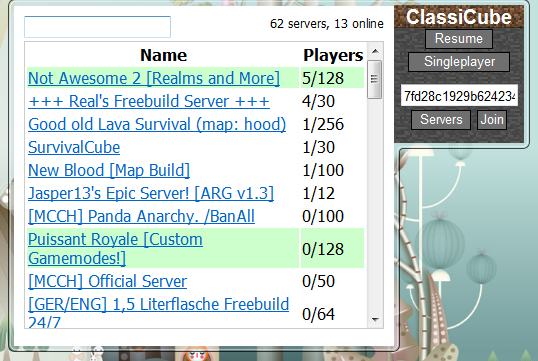
I made a gadget for Windows 7 / Vista (or higher with GadgetPack) that can launch ClassiCube. Download | Source
-
-
I added nametags similar to those found in LCE. It just uses the first color in the name for the border.
-
Here's the exact values from TexturePack.c: static BitmapCol fallback_terrain[16 * 8] = { BitmapColor_RGB( 96, 144, 85), BitmapColor_RGB(129, 128, 127), BitmapColor_RGB(123, 87, 66), BitmapColor_RGB(174, 124, 74), BitmapColor_RGB(184, 151, 105), BitmapColor_RGB(200, 200, 197), BitmapColor_RGB(175, 173, 173), BitmapColor_RGB(153, 101, 75), BitmapColor_RGB(118, 111, 101), BitmapColor_RGB( 61, 20, 11), BitmapColor_RGB(179, 67, 23), BitmapColor_RGB(154, 128, 89), BitmapColor_RGB(163, 2, 29), BitmapColor_RGB(203, 206, 2), BitmapCol_Make(86,144,216,128), BitmapColor_RGB( 38, 88, 41), /* 16*/ BitmapColor_RGB(165, 163, 159), BitmapColor_RGB( 37, 48, 61), BitmapColor_RGB(227, 223, 151), BitmapColor_RGB(160, 152, 147), BitmapColor_RGB( 90, 71, 58), BitmapColor_RGB(173, 135, 87), BitmapColor_RGB( 38, 98, 37), BitmapColor_RGB(225, 229, 235), BitmapColor_RGB(246, 231, 23), BitmapColor_RGB(225, 218, 157), BitmapColor_RGB(247, 243, 234), BitmapColor_RGB( 57, 115, 158), BitmapColor_RGB(226, 18, 18), BitmapColor_RGB(172, 131, 101), BitmapColor_RGB(255, 122, 31), BitmapColor_RGB( 79, 120, 79), /* 32 */ BitmapColor_RGB(129, 128, 127), BitmapColor_RGB(189, 151, 134), BitmapColor_RGB( 53, 44, 61), BitmapColor_RGB(180, 151, 102), BitmapColor_RGB(165, 163, 159), BitmapColor_RGB( 20, 20, 33), BitmapColor_RGB(243, 139, 28), BitmapColor_RGB(193, 197, 202), BitmapColor_RGB(235, 188, 32), BitmapColor_RGB(203, 193, 135), BitmapColor_RGB(224, 220, 212), BitmapColor_RGB( 52, 90, 134), BitmapColor_RGB( 57, 115, 158), BitmapColor_RGB( 52, 90, 134), BitmapColor_RGB( 57, 115, 158), BitmapColor_RGB(174, 124, 74), /* 48 */ BitmapColor_RGB(175, 148, 43), BitmapColor_RGB(188, 225, 231), BitmapColor_RGB(238, 245, 245), BitmapCol_Make(205,232,252,128),BitmapColor_RGB(153, 150, 149), BitmapColor_RGB(105, 80, 54), BitmapColor_RGB(236, 236, 240), BitmapColor_RGB(161, 165, 170), BitmapColor_RGB(225, 146, 30), BitmapColor_RGB(203, 193, 135), BitmapColor_RGB(247, 243, 234), BitmapColor_RGB( 57, 115, 158), BitmapColor_RGB( 52, 90, 134), BitmapColor_RGB( 57, 115, 158), BitmapColor_RGB( 52, 90, 134), BitmapColor_RGB( 57, 115, 158), /* 64 */ BitmapColor_RGB(217, 35, 35), BitmapColor_RGB(219, 137, 13), BitmapColor_RGB(224, 224, 0), BitmapColor_RGB(128, 221, 2), BitmapColor_RGB( 13, 217, 13), BitmapColor_RGB( 8, 218, 133), BitmapColor_RGB( 4, 219, 219), BitmapColor_RGB( 89, 175, 219), BitmapColor_RGB(122, 122, 217), BitmapColor_RGB(131, 39, 225), BitmapColor_RGB(178, 69, 230), BitmapColor_RGB(227, 52, 227), BitmapColor_RGB(227, 41, 133), BitmapColor_RGB( 73, 73, 73), BitmapColor_RGB(151, 151, 151), BitmapColor_RGB(227, 227, 227), /* 80 */ BitmapColor_RGB(220, 127, 162), BitmapColor_RGB( 42, 66, 8), BitmapColor_RGB( 75, 37, 11), BitmapColor_RGB( 24, 37, 149), BitmapColor_RGB( 29, 113, 149), BitmapColor_RGB(155, 161, 174), BitmapColor_RGB(167, 41, 13), BitmapColor_RGB( 57, 115, 158), BitmapColor_RGB( 52, 90, 134), BitmapColor_RGB( 57, 115, 158), BitmapColor_RGB( 52, 90, 134), BitmapColor_RGB( 57, 115, 158), BitmapColor_RGB( 52, 90, 134), BitmapColor_RGB( 57, 115, 158), BitmapColor_RGB( 52, 90, 134), BitmapColor_RGB( 57, 115, 158), /* 96 */ BitmapColor_RGB( 57, 115, 158), BitmapColor_RGB( 52, 90, 134), BitmapColor_RGB( 57, 115, 158), BitmapColor_RGB( 52, 90, 134), BitmapColor_RGB( 57, 115, 158), BitmapColor_RGB( 52, 90, 134), BitmapColor_RGB( 57, 115, 158), BitmapColor_RGB( 52, 90, 134), BitmapColor_RGB( 57, 115, 158), BitmapColor_RGB( 52, 90, 134), BitmapColor_RGB( 57, 115, 158), BitmapColor_RGB( 52, 90, 134), BitmapColor_RGB( 57, 115, 158), BitmapColor_RGB( 52, 90, 134), BitmapColor_RGB( 57, 115, 158), BitmapColor_RGB( 52, 90, 134), /* 112 */ BitmapColor_RGB( 52, 90, 134), BitmapColor_RGB( 57, 115, 158), BitmapColor_RGB( 52, 90, 134), BitmapColor_RGB( 57, 115, 158), BitmapColor_RGB( 52, 90, 134), BitmapColor_RGB( 57, 115, 158), BitmapColor_RGB( 52, 90, 134), BitmapColor_RGB( 57, 115, 158), BitmapColor_RGB( 52, 90, 134), BitmapColor_RGB( 57, 115, 158), BitmapColor_RGB( 52, 90, 134), BitmapColor_RGB( 57, 115, 158), BitmapColor_RGB( 52, 90, 134), BitmapColor_RGB( 57, 115, 158), BitmapColor_RGB( 52, 90, 134), BitmapColor_RGB( 57, 115, 158), };
-
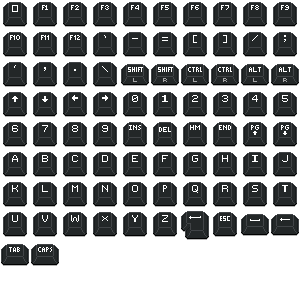
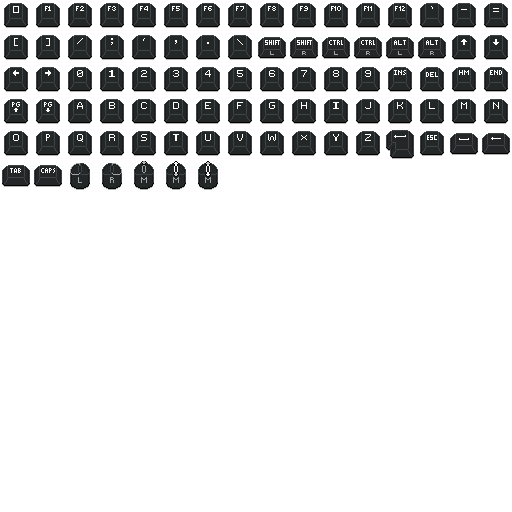
I made the KB+M icons from Legacy4J into an atlas. I wonder how far I'll get with tooltips. I'm not a very good programmer. It's not done, I still need to add mouse stuff. Y'all, I'm an idiot. You have to make textures powers of two. ITS THE LAW. I fixed it though but I had to scale the pixel art 😞 that hurt. Maybe I could have centered it. I'll look into it. Yeah, I could just center a 30x30 inside of a 32x32 square.
-
Padding at the end of the screen. I think they did this for overscan and stuff but I think it just looks nice. The way I did it breaks everything though so I have to fix it.
-
In LCE, at the border of the world, the noise scales down (I think it works that way) and converges on a single height (until TU69 broke it) For kicks I did it in ClassiCube
.jpeg.a2d4f0f0bb094e55edc8eaf3b11c86fe.jpeg)
-
The current ClassiCube client, written by UnknownShadow2000 is written in C. Before ClassiCube, there was Classical sharp, a client written in C#. MCGalaxy, the most popular server software, was also written in C# but did not receive a rewrite due to it not being necessary. Most developers here use Visual Studio because of its proximity to C# and also working well with C.