Jump to content
View in the app

A better way to browse. Learn more.

ClassiCube Forum

A full-screen app on your home screen with push notifications, badges and more.

To install this app on iOS and iPadOS
  1. Tap the Share icon in Safari
  2. Scroll the menu and tap Add to Home Screen.
  3. Tap Add in the top-right corner.
To install this app on Android
  1. Tap the 3-dot menu (⋮) in the top-right corner of the browser.
  2. Tap Add to Home screen or Install app.
  3. Confirm by tapping Install.

Blox

Glod Menbie
  • Joined

  • Last visited

  1. Blox changed their profile photo
  2. Okay so the thing i really need to know is how do i make a classicube server?
  3. How

    Blox replied to Blox's topic in I Need Help!
    its only for some maps its maybe cause im using the online version
  4. How

    Blox replied to Blox's topic in I Need Help!
    no it isnt its in every game
  5. How

    Blox replied to Blox's topic in I Need Help!
    but it isnt the same for me
  6. How

    Blox posted a topic in I Need Help!
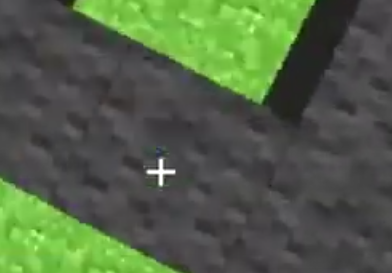
    How do i make the plus sign in my screen look like the minecraft plus sign? example:
  7. graphictoria doesn't exist anymore
  8. Well thank you for the link, it justs brings me to NA2
  9. Okay, thank you. Im still trying to break blocks and place blocks but it isnt working Ok how do i place blocks down on NA2 survival?
  10. I tried that logic 100,000
  11. you cant even place down blocks and delete blox
  12. Okay not awesome survival is terrible
  13. then how do i play it?
  14. Are there any mineplex servers? if not can you make one?
  15. command* + \

Configure browser push notifications

Chrome (Android)
  1. Tap the lock icon next to the address bar.
  2. Tap Permissions → Notifications.
  3. Adjust your preference.
Chrome (Desktop)
  1. Click the padlock icon in the address bar.
  2. Select Site settings.
  3. Find Notifications and adjust your preference.