

Jump to content
View in the app

A better way to browse. Learn more.

ClassiCube Forum

A full-screen app on your home screen with push notifications, badges and more.

To install this app on iOS and iPadOS
  1. Tap the Share icon in Safari
  2. Scroll the menu and tap Add to Home Screen.
  3. Tap Add in the top-right corner.
To install this app on Android
  1. Tap the 3-dot menu (⋮) in the top-right corner of the browser.
  2. Tap Add to Home screen or Install app.
  3. Confirm by tapping Install.

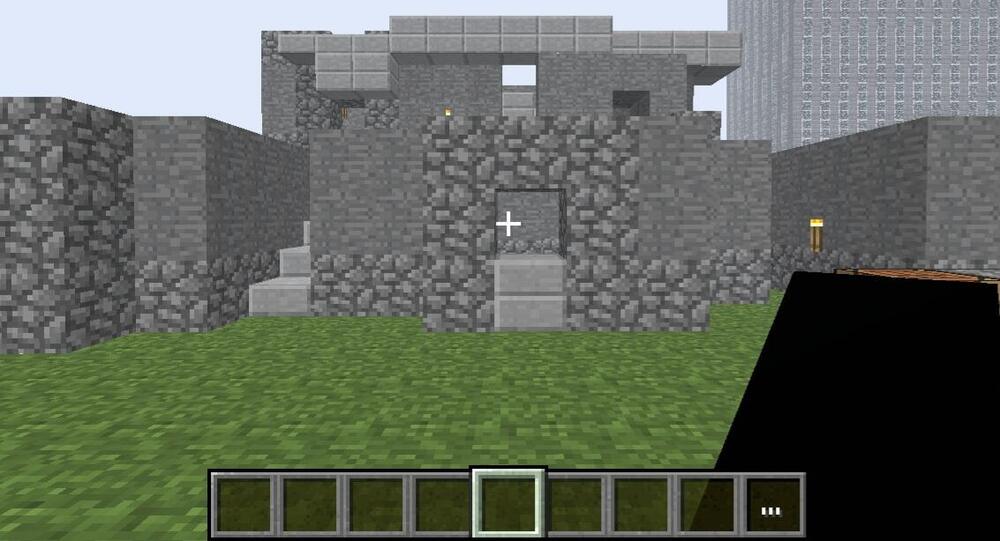
Another angle of my kowloon walled citybinspired build

This is another angle of my kowloon walled city build which if imma be real this one looks a lot better then the other but also at the same time it isn't really finished so uh yea.Screenshot_20250202_234702.thumb.jpg.eb97d9c6c3d705ea088c888b22b6896e.jpg
Featured Replies

Why make another thread? You could have replied to your original thread with more screenshots instead of making another one.

Owner and founder of Good old Lava Survival, MCGalaxy plugin developer, Master of evil hacks not supported by UnknownShadow.

  • Author
6 hours ago, icanttellyou said:

Why make another thread? You could have replied to your original thread with more screenshots instead of making another one.

oh well when I tried doing that I apparently exceeded the limit so I'd figure you're only allowed to post one image per post, either that or I just didn't relize I could've just done that from the start ;-;

Edited by Mr.anonymous_z

  • 3 weeks later...
  • Author

Here is an update on my Kowloon ahh build

image_2025-02-23_134502307-min.thumb.png.f173f5fc83953cd939c7750b01ce5788.png

This is an angle taken from the narrow stairways (and yes so far this is the only one)

screenshot_2025-02-18-14-37-26.thumb.png.a2076519b17e7ff0052b47d2d3a05689.png

This is an angle of what each floor looks kinda weird looking but I don't mind since its meant to be narrow and chaotic or something

screenshot_2025-02-18-14-36-55.thumb.png.b39b1cf0716f7de0badb6a670266cf84.png

Edited by Mr.anonymous_z

READ THE RULES BEFORE YOU POST

Create an account or sign in to comment

Configure browser push notifications

Chrome (Android)
  1. Tap the lock icon next to the address bar.
  2. Tap Permissions → Notifications.
  3. Adjust your preference.
Chrome (Desktop)
  1. Click the padlock icon in the address bar.
  2. Select Site settings.
  3. Find Notifications and adjust your preference.
