



Tracy_Cage
Member
-
Joined
-
Last visited
-
 Tracy_Cage changed their profile photo
 -
Gee with all that I could buy a single GPU in today's market.
-
-
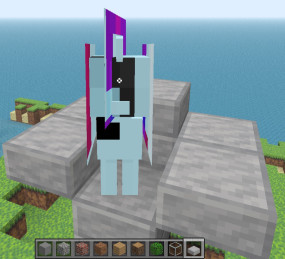
I'm trying to use the pony model plugin from here: https://github.com/ClassiCube/ClassiCube-Plugins/tree/master/Pony but whenever I select the model in-game I end up looking like an abomination (see attached image). Obviously it has something to do with my skin, so my question is how do I need to change/format my skin in order to work with this model?
-
I had a question for the developers, and I also wanted to open a discussion around it. Is Classicube considered feature-complete? It seems everything from Minecraft classic has been recreated successfully at this point, so I'm curious as to whether or not the developers are interested in implementing new optional content to the game. I know, I know, survival mode isn't going to be added ever, and that's not really my angle in asking. As I understand it, there's not much purpose in adding things like blocks as they can added by servers without difficulty. But what about things that can't be easily added with server plugins like more configurable generation options, controller support, redstone wiring equivalents, colored lighting/shaders, subsystems for displaying text and images on blocks etc. I guess I'm asking if the scope of Classicube will ever expand beyond recreating version 0.30 with some optional additions into a project with many optional additions. Apologies if this was answered elsewhere.
