I'm running Windows XP SP3, fully updated, including all the POSReady updates. When I try to download resources, I get Error 80090326 when it gets to the sound.
I've snooped around - the common consensus for this problem is that TLS 1.2 isn't enabled, however it is - I've even been able to download Minecraft using Betacraft and OLauncher without issue.
I'm aware that the easiest solution would be to download the resources on another system, however i hope y'all understand why I'm not settling for that - from my understanding I fit all the requirements to download the resources, yet I can't. Any suggestions are appreciated.
EDIT: I've come back 5 hours later to provide some extra context.
Here's a list of things I CAN do:
- Sign in
- Connect to servers
- Download server resource packs
- Pretty much everything except download the Minecraft resources (only a problem with the Classicube launcher, as stated above)
I'm starting to think this has next to nothing to do with networking. Error 80090326 might be a generic error for a SSL/TLS failure, but my TLS is fine and my certificates are up to date.
I've seen a couple of users on Windows 7 who had trouble installing resources, and fixed it by installing one illusive update - which doesn't exist for Windows XP (I would know, I have them all)
Overall it's not a massive issue and I'm coping hard by giving this much detail about it but I would love some insight: is this a problem with my system, Windows XP in general, or the Classicube launcher?



I'm running Windows XP SP3, fully updated, including all the POSReady updates. When I try to download resources, I get Error 80090326 when it gets to the sound.
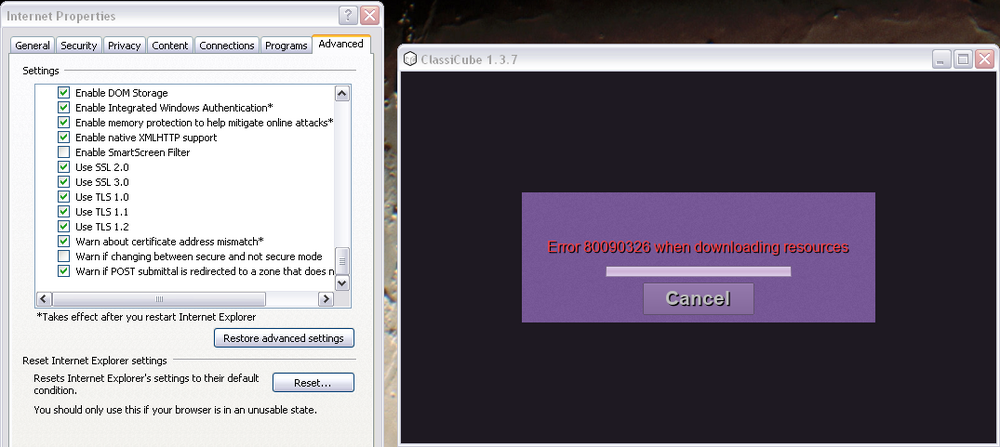
I've snooped around - the common consensus for this problem is that TLS 1.2 isn't enabled, however it is - I've even been able to download Minecraft using Betacraft and OLauncher without issue.
I'm aware that the easiest solution would be to download the resources on another system, however i hope y'all understand why I'm not settling for that - from my understanding I fit all the requirements to download the resources, yet I can't. Any suggestions are appreciated.
EDIT: I've come back 5 hours later to provide some extra context.
Here's a list of things I CAN do:
- Sign in
- Connect to servers
- Download server resource packs
- Pretty much everything except download the Minecraft resources (only a problem with the Classicube launcher, as stated above)
I'm starting to think this has next to nothing to do with networking. Error 80090326 might be a generic error for a SSL/TLS failure, but my TLS is fine and my certificates are up to date.
I've seen a couple of users on Windows 7 who had trouble installing resources, and fixed it by installing one illusive update - which doesn't exist for Windows XP (I would know, I have them all)
Overall it's not a massive issue and I'm coping hard by giving this much detail about it but I would love some insight: is this a problem with my system, Windows XP in general, or the Classicube launcher?
Edited by officeclown