Jump to content
View in the app

A better way to browse. Learn more.

ClassiCube Forum

A full-screen app on your home screen with push notifications, badges and more.

To install this app on iOS and iPadOS
  1. Tap the Share icon in Safari
  2. Scroll the menu and tap Add to Home Screen.
  3. Tap Add in the top-right corner.
To install this app on Android
  1. Tap the 3-dot menu (⋮) in the top-right corner of the browser.
  2. Tap Add to Home screen or Install app.
  3. Confirm by tapping Install.

KykywaHckuu

Member
  • Joined

  • Last visited

Everything posted by KykywaHckuu

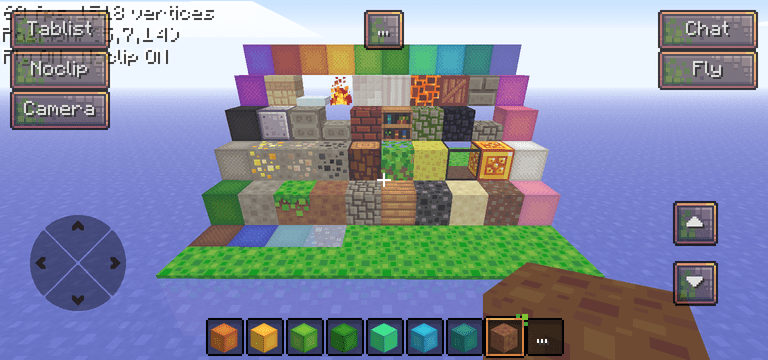
  1. For now i didn't made the animated textures. Sorry, I were was just too lazy to do them :3 New version guys!!! I've done the animations, so now water, fire, and lava are animated :33 (Sorry for no preview, its because of the 1mb size limit 3:< ) BlockPixelPort.zip
  2. Hello my dear Classicube community! I felt productive today in the evening, and so i've ported this texture pack! I like simplicite texture packs and I hope you too! Changes only the terrain and gui for now :33 (my first post btw) BlockpixelPort.zip

Configure browser push notifications

Chrome (Android)
  1. Tap the lock icon next to the address bar.
  2. Tap Permissions → Notifications.
  3. Adjust your preference.
Chrome (Desktop)
  1. Click the padlock icon in the address bar.
  2. Select Site settings.
  3. Find Notifications and adjust your preference.