CunningConfused
Member
-
Joined
-
Last visited
-
 CunningConfused changed their profile photo
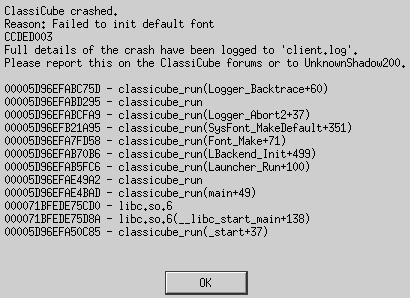
 -
Getting this error too, here are some details from my method: On Arch Linux, installed ClassiCube using the classicube-git AUR package. Running classicube_run gives the following popups: And the following output on the CLI: Working directory is $HOME! Changing to executable directory.. Starting ClassiCube 1.3.6 .. Falling back to glXChooseVisual. Created window (visual id: 00000370) Face: Gen Jyuu GothicX Light R = /usr/share/fonts/GenJyuuGothicX/GenJyuuGothicX-Light.ttf,0 Face: Gen Jyuu Gothic XP R = /usr/share/fonts/GenJyuuGothicX/GenJyuuGothicX-P-Regular.ttf,0 Face: Gen Jyuu GothicX Medium R = /usr/share/fonts/GenJyuuGothicX/GenJyuuGothicX-Medium.ttf,0 Face: Gen Jyuu Gothic X Monospace Heavy B = /usr/share/fonts/GenJyuuGothicX/GenJyuuGothicX-Monospace-Heavy.ttf,0 Face: Gen Jyuu Gothic X Monospace R = /usr/share/fonts/GenJyuuGothicX/GenJyuuGothicX-Monospace-Regular.ttf,0 Face: Gen Jyuu Gothic X Monospace B = /usr/share/fonts/GenJyuuGothicX/GenJyuuGothicX-Monospace-Bold.ttf,0 Face: Gen Jyuu Gothic XP Heavy B = /usr/share/fonts/GenJyuuGothicX/GenJyuuGothicX-P-Heavy.ttf,0 Face: Gen Jyuu Gothic XP Light R = /usr/share/fonts/GenJyuuGothicX/GenJyuuGothicX-P-Light.ttf,0 Face: Gen Jyuu Gothic XP Medium R = /usr/share/fonts/GenJyuuGothicX/GenJyuuGothicX-P-Medium.ttf,0 Face: Gen Jyuu Gothic XP ExtraLight R = /usr/share/fonts/GenJyuuGothicX/GenJyuuGothicX-P-ExtraLight.ttf,0 Face: Gen Jyuu Gothic X Monospace Light R = /usr/share/fonts/GenJyuuGothicX/GenJyuuGothicX-Monospace-Light.ttf,0 And client.log is: