FAM0R
Glodden Godd
-
Joined
-
Last visited
Everything posted by FAM0R
-
 Assuming you're using MCGalaxy, you can put the .cw file into the server's /extra/import/ folder, then in-game run the command /import [filename] to convert it into a .lvl that the server can load.
 -
You can use the PgUp and PgDown keys to scroll the chat.
-
Are you by any chance using a browser extension that forces HTTPS? The web client must use HTTP for connecting to servers, and an extension preventing that could lead in a redirect loop.
-
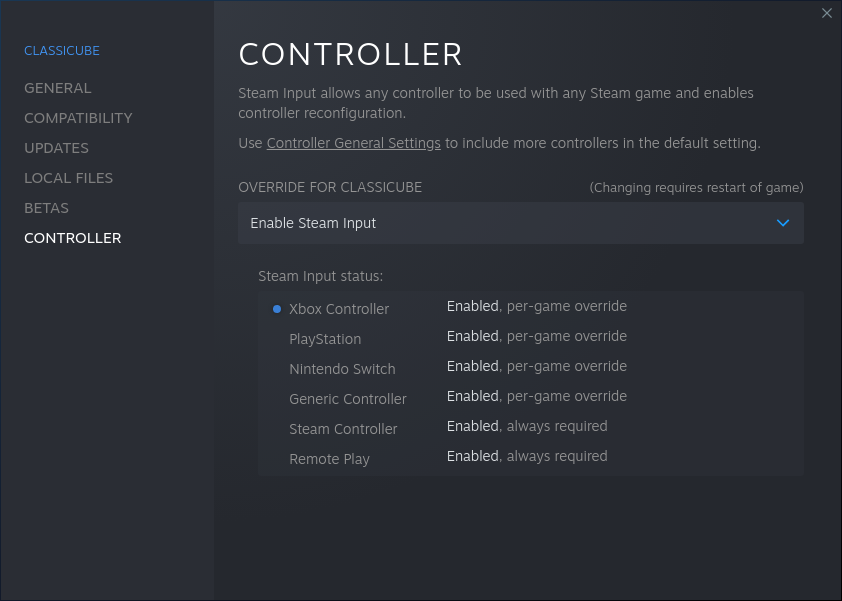
ClassiCube does not have built-in controller support, but if you own the game on steam (or you add it as a third party game to your steam library), you can right click the game in library, go to the controller tab and enable Steam Input to get controller support
-
Go in-game, go to options > misc options and enable "Auto close launcher"
-
-
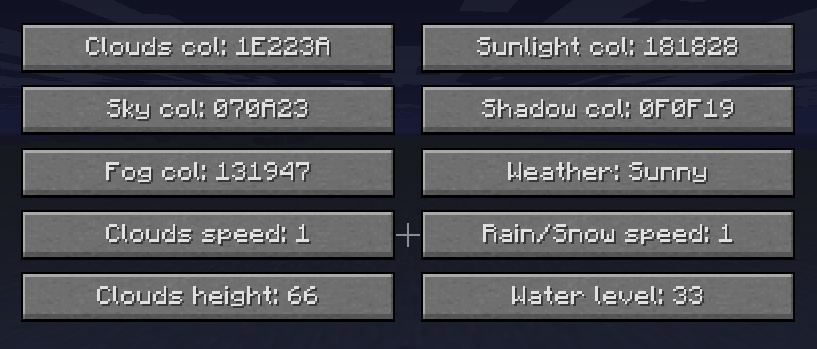
In the options, env settings, you can change the environment settings of your singleplayer world. You can find some example values here https://github.com/UnknownShadow200/MCGalaxy/blob/master/MCGalaxy/Levels/EnvPreset.cs#L31 or you can create your own colors by playing around with the values If you're playing on a (mcgalaxy) server, you can use /env preset or /os env preset to change the map environment presets Here's the what the values for the Midnight preset would look like in the menu
-
-
I think you're confusing 2FA tokens and personal access or OAuth tokens. This change doesn't require you to enable 2FA (even though you should!!), it just requires you to create a personal access token or an ssh key that you'll use instead of a password. Using your password for git authentication has always been a bad idea, so it's good that they're finally disabling that completely
-
https://github.com/UnknownShadow200/MCGalaxy-Plugins/blob/master/GoodlyEffects.cs https://github.com/UnknownShadow200/MCGalaxy-Plugins/blob/master/documentation/GoodlyEffects.md * some assembly required, batteries not included.
-
/checkpoint do it I dare you

-
Solved. Server had Verify Names disabled in mcgalaxy settings so anyone could log in without authenticating. It's enabled now
-
There's instructions at https://github.com/UnknownShadow200/ClassiCube/blob/master/doc/hosting-webclient.md
-
The ClassiCube client isn't written in C# anymore, and thus you don't use mono to run it. You should download the proper version for your operating system from https://www.classicube.net/download/
-
-
You can find them at archive.org https://archive.org/details/MCPEAlpha
-
-
-