noah_idk
Member
-
Joined
-
Last visited
-
 noah_idk changed their profile photo
 -
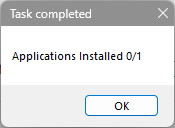
I am trying to install ClassiCube using the apk from the official website and it isn't installing. I am running on Android 4.0.4 which is above minimum (2.3) and when i go to install it using ADB (which has worked for all of the compatible apps so far since i can't file manager to the internal storage and i'm too lazy right now to find an unused SD card) and it gives me "applications installed 0/1". does this just mean that ClassiCube doesn't support x86, do i need rummage for an SD card, or do i need to do something else? I am trying to use ADB AppControl 1.8.6 to install it (My phone i am trying to use is the weirdly brand named Kyocera Rise if that's of any use) Apparently uninstalling and trying to reinstalled made it install even though it doesn't open