Jump to content
View in the app

A better way to browse. Learn more.

ClassiCube Forum

A full-screen app on your home screen with push notifications, badges and more.

To install this app on iOS and iPadOS
  1. Tap the Share icon in Safari
  2. Scroll the menu and tap Add to Home Screen.
  3. Tap Add in the top-right corner.
To install this app on Android
  1. Tap the 3-dot menu (⋮) in the top-right corner of the browser.
  2. Tap Add to Home screen or Install app.
  3. Confirm by tapping Install.

saedyabd

Member
  • Joined

  • Last visited

Everything posted by saedyabd

  1. thanks for telling me
  2. i geniunely cant find the option, sorry for disturbing yall.
  3. alwaysonmymind by ericdoa (extended version) im boutta give you my whole 3 year playlist wait a bit
  4. so i downloaded cef but it keeps telling me the plugin is outdated or the game is outdated but i checked both and they are up to date
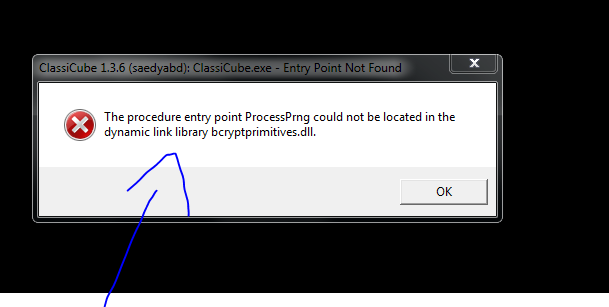
  5. brand/model: toshiba satellite l300 pro (replaced mobo) processor: intel(r) core(tm) 2 duo cpu t5870 @2.00ghz (2 cpus), ~2.0 ghz ram: 3072 mb gpu: mobile intel(r) 965 expresschipset family vram:358 mb hdd: idk monitor: built in laptop one monitor name:LP154WX4-TLC8 mouse: old dell mouse you can find in schools keyboard : sometimes i use the inbuilt laptop keyboard other keyboard logitech k400+

Configure browser push notifications

Chrome (Android)
  1. Tap the lock icon next to the address bar.
  2. Tap Permissions → Notifications.
  3. Adjust your preference.
Chrome (Desktop)
  1. Click the padlock icon in the address bar.
  2. Select Site settings.
  3. Find Notifications and adjust your preference.